Loading
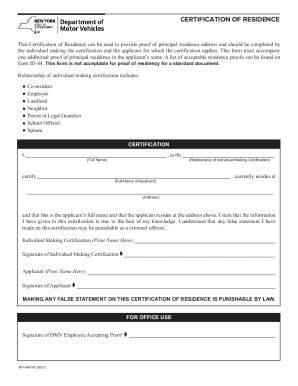
Get Ny Dmv Mv-44nyr 2021-2026
How it works
-

Open form follow the instructions
-

Easily sign the form with your finger
-

Send filled & signed form or save
How to fill out the NY DMV MV-44NYR online
Filling out the NY DMV MV-44NYR form is an important step for providing proof of residency. This guide will take you through the online process step-by-step, ensuring that you understand each component of the form.
Follow the steps to complete the form effectively.
- Click ‘Get Form’ button to obtain the form and open it in the editor.
- Begin by identifying yourself as the individual making the certification. In the appropriate field, input your relationship to the applicant, choosing from options such as co-resident, employer, landlord, neighbor, parent or legal guardian, school official, or spouse.
- Next, enter your full name in the designated field.
- Identify the applicant by entering their full name in the given space.
- Provide the applicant’s residential address in the respective field to confirm their principal residence.
- Ensure that all information provided is accurate. Review the certification statement and confirm your understanding regarding the truthfulness of the information.
- Print your name in the section labeled 'Individual Making Certification' and provide your signature where indicated.
- The applicant should then print their name and sign in the designated areas.
- After fully completing the form, save your changes. You may choose to download, print, or share the form as needed to ensure it is submitted alongside appropriate proof of residence.
Complete your documents online with confidence!
Their online appointment system is available 24/7 or you can schedule your appointment by phone. Simply call 1-800-777-0133 during normal business hours. You can check your local DMV office location and their business hours.