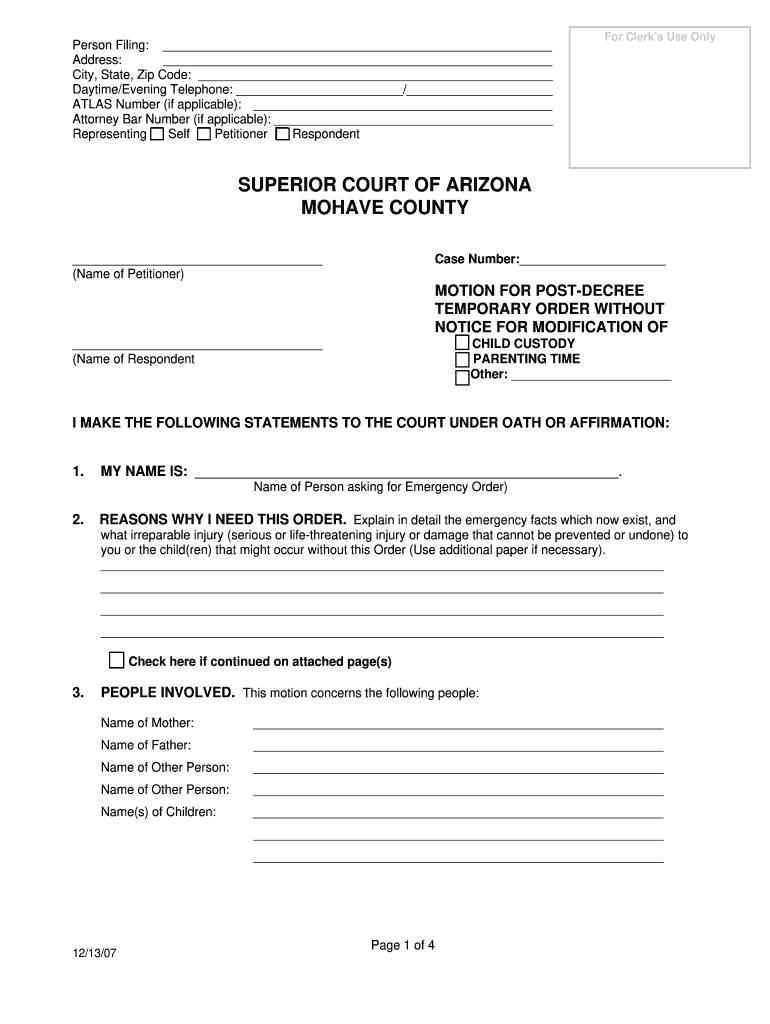
Daytime/Evening Telephone: / ATLAS Number (if applicable): Attorney Bar Number (if applicable): Self Petitioner Respondent Representing For Clerk s Use Only SUPERIOR COURT OF ARIZONA MOHAVE COUNTY (Name of Petitioner) Case Number: MOTION FOR POST-DECREE TEMPORARY ORDER WITHOUT NOTICE.
Loading

Open form follow the instructions

Easily sign the form with your finger

Send filled & signed form or save
How to fill out the AZ Mohave County online
Filling out the AZ Mohave County form online is a straightforward process that allows users to submit important legal documents efficiently. This guide will provide step-by-step instructions to help users complete the form with confidence and clarity.
Follow the steps to fill out the AZ Mohave County form online.
- Click 'Get Form' button to obtain the form and open it in the editor.
- Enter the personal information of the person filing at the top of the form, including their name, address, city, state, zip code, and telephone numbers.
- If applicable, provide the ATLAS number and Attorney Bar number by entering them in the designated fields.
- Indicate your role in the case by selecting 'Self', 'Petitioner', 'Respondent', or 'Representing' from the available options.
- In the section titled 'I MAKE THE FOLLOWING STATEMENTS TO THE COURT UNDER OATH OR AFFIRMATION', write your name where prompted and explain in detail why you need this order by detailing the emergency facts that exist.
- List all people involved in the case, including the names of the mother, father, and other relevant individuals, as well as the names of the children.
- Provide required information regarding notice or reasons for not attempting to give notice to other parties. Explain your actions regarding notice in the space provided.
- Indicate if you are filing or plan to file a regular petition for modification and provide the date of that filing.
- Fill out information about any other emergency cases involving the same parties or children, including past cases and their details.
- Detail all other court cases involving either or both parties, ensuring to address both pending and past cases.
- If applicable, address any involvement of government agencies with the parties or children, explaining the situation clearly.
- Explain any criminal charges against either party that may affect the case.
- Make specific requests to the court, such as temporary custody adjustments, and check the relevant boxes.
- Complete the oath or affirmation and provide your signature along with the date.
- Once finished, review the completed form for accuracy before saving changes, downloading, printing, or sharing the document as needed.
Encourage users to compete documents online confidently and effectively.
Experience a faster way to fill out and sign forms on the web. Access the most extensive library of templates available.
Related content
Mohave County is home to four limited jurisdiction justice courts established by the...
Our staff connects Mohave County residents to University science and other expert advice...
Mohave Energy - Hybrid solar project is an operating solar photovoltaic (PV) farm in...
Get answers to your most pressing questions about US Legal Forms API.
At what age do seniors stop paying property taxes in Arizona?
In Arizona, including AZ Mohave County, seniors aged 65 and older may qualify for property tax exemptions or reductions. However, seniors must meet specific income requirements to benefit from these tax laws. It's essential for seniors to consult local resources or a tax professional for personalized advice. Utilizing platforms like uslegalforms can simplify the process of finding exemptions and understanding eligibility criteria.
How are property taxes calculated in Mohave County AZ?
In AZ Mohave County, property taxes are calculated based on the property's assessed value and the local tax rate. The county assesses properties annually, using a standardized formula to determine value. Once assessed, the property tax rate—derived from the region's budgetary needs—applies to the assessed value. For detailed guidance on property tax calculations, you can refer to uslegalforms, where resources are available to help understand the process.
What cities are included in Mohave County?
AZ Mohave County includes several cities and towns, such as Kingman, Bullhead City, and Lake Havasu City. Each city offers unique attractions and amenities that appeal to residents and visitors alike. Whether you are looking for recreational activities or historical sites, AZ Mohave County has diverse options to explore. Consider checking local resources for more information on what each city has to offer.
What district is Mohave County in?
AZ Mohave County is located within the 1st Congressional District of Arizona. It encompasses several legislative districts that serve the local population. This district provides resources and representation for residents in various governmental matters. Staying informed about your district can enhance your civic engagement and help you access local services.
How much are property taxes in Mohave County?
Property taxes in AZ Mohave County vary based on the property's assessed value and the local tax rates. Generally, property tax rates in the county range from approximately 0.5% to 1.25%. To get an accurate estimate, you should check the local tax assessor's website or use property tax calculators. Additionally, using platforms like uslegalforms can help you understand your responsibilities regarding property taxes.
What county is Kingman in?
Kingman is located in AZ Mohave County, serving as the county seat. This city plays a vital role in the region's transportation and economic sectors. Being in Kingman means you are at the heart of Mohave County's activities and services, contributing to both community life and local governance.
What is the crime rate in Mohave County Arizona?
The crime rate in AZ Mohave County has shown fluctuations, similar to many other areas. While certain types of crime may be higher relative to national averages, overall safety measures exist that can help you stay informed. For residents, understanding local crime statistics is essential for making informed decisions about living and working in the area.
How many dogs can you have in Mohave County AZ?
In AZ Mohave County, pet owners typically can keep up to four dogs without needing a special permit. If you own more than four, it's advisable to check with your local animal control for additional regulations. Keeping track of these pet ownership rules ensures a harmonious relationship within the community and helps you comply with local laws.
What planting zone is Mohave County AZ?
AZ Mohave County falls within USDA planting zones 8a to 9b, depending on the specific area. This means you can grow a variety of plants, including many native species and garden favorites. Knowing your planting zone helps gardeners choose the right plants for their landscape, ensuring better growth and sustainability.
What is considered Mohave County?
AZ Mohave County includes areas such as Lake Havasu City, Bullhead City, and Kingman. It is known for its eclectic mix of landscapes, from the Colorado River to the expansive desert. Understanding what falls within Mohave County parameters can help you navigate local services, recreational opportunities, and community events.
Use professional pre-built templates to fill in and sign documents online faster. Get access to thousands of forms.
If you believe that this page should be taken down, please follow our DMCA take down process here.