Loading
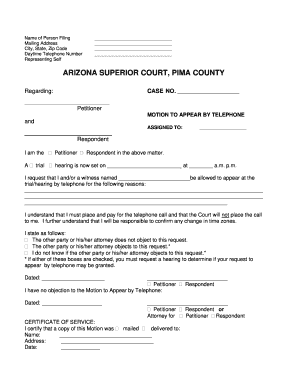
Get Az Motion Appear Telephone
How it works
-

Open form follow the instructions
-

Easily sign the form with your finger
-

Send filled & signed form or save
How to fill out the AZ Motion Appear Telephone online
This guide provides a comprehensive overview of completing the AZ Motion Appear Telephone form online. Whether you are familiar with legal documents or new to the process, this step-by-step approach will assist you in filing your motion with confidence.
Follow the steps to fill out the AZ Motion Appear Telephone online effectively.
- Use the 'Get Form' button to access the AZ Motion Appear Telephone form and launch it in your preferred editor.
- Begin by entering your name, mailing address, city, state, zip code, and daytime telephone number in the appropriate fields. This information is crucial as it identifies the person filing the motion.
- Next, provide the case number. Ensure that the case number matches the one assigned to your ongoing matter. This is essential for accurate processing.
- Indicate whether you are the petitioner by checking the corresponding box. This establishes your role in the case.
- Fill in the date and time of the trial or hearing, specifying a.m. or p.m. as necessary. Accurate timing is key for the court proceedings.
- Clearly state the reason for your request to appear by telephone. Include all relevant details that justifies your absence in person.
- Indicate whether the other party or their attorney objects to your request. Based on your response, the court may require a hearing to address the motion.
- Date and sign your motion at the indicated section. If applicable, ensure the other party also dates and signs the form indicating their agreement or lack of objection.
- Make copies of the completed AZ Motion Appear Telephone form for your records and the other party.
- Proceed to complete the Notice of Hearing and the Order forms, replicating the necessary steps and making additional copies.
- File the original Motion to Appear by Telephone, along with the Notice of Hearing and Order, at the Clerk of the Court. There is no filing fee for these documents.
- Follow through with required communication regarding your motion's outcome. If required, serve the other party with copies of the filed documents.
- After all documents are served, be sure to confirm the date and time of your court hearing and make the necessary phone arrangements for your appearance.
Start filling out the AZ Motion Appear Telephone online today for a smooth filing experience!
Whether to attend court in person or online depends on your individual circumstances. In-person attendance can foster personal connections with the judge and other parties, while online options, such as using AZ Motion Appear Telephone, offer convenience and flexibility. Consider your situation carefully and choose the option that best suits your needs.