Loading
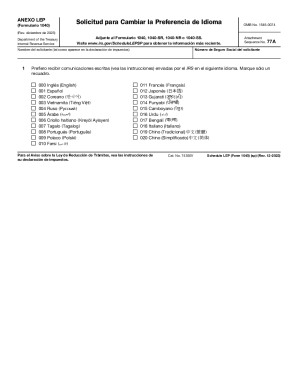
Get Irs 1040 - Schedule Lep (sp) 2022-2026
How it works
-

Open form follow the instructions
-

Easily sign the form with your finger
-

Send filled & signed form or save
How to use or fill out the IRS 1040 - Schedule LEP (SP) online
Filling out the IRS 1040 - Schedule LEP (SP) is an essential step for individuals with limited English proficiency, allowing them to receive communications from the IRS in their preferred language. This guide provides a clear and supportive approach to assist users in completing the form online.
Follow the steps to complete the IRS 1040 - Schedule LEP (SP) online.
- Click ‘Get Form’ button to obtain the form and open it in the editor.
- Enter the applicant's social security number in the designated field, ensuring the number matches the one on your tax return.
- Input the applicant's name as it appears on the tax return, ensuring correct spelling and order.
- In the section provided, select one language from the list where you prefer to receive written communications from the IRS by marking the appropriate box. Only choose one language.
- If you are submitting a joint tax return, ensure that each spouse that wants a different language preference submits their own 1040 - Schedule LEP (SP).
- Review all entries for accuracy before finalizing. Changes can be made if necessary by re-selecting the language preference.
- After completing the form, save the changes, and proceed to download, print, or share the form as required.
Complete your IRS 1040 - Schedule LEP (SP) online to ensure you receive important information in your preferred language.
Related links form
One such schedule is Schedule E (Form 1040), which is used to report supplemental income and loss. Schedule E (Form 1040) is an Internal Revenue Service (IRS) form used to report supplemental income and loss from various sources, with the primary focus on rental real estate activities.