Loading
Get Ca Fppc 470/470 Supplement 2016-2026
How it works
-

Open form follow the instructions
-

Easily sign the form with your finger
-

Send filled & signed form or save
How to fill out the CA FPPC 470/470 Supplement online
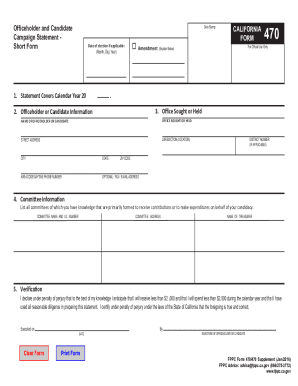
The CA FPPC 470 and its Supplement are essential forms used by officeholders and candidates who do not anticipate significant campaign contributions or expenditures. This guide will provide clear, step-by-step instructions for filling out these forms online.
Follow the steps to complete the CA FPPC 470 and Supplement efficiently.
- Click ‘Get Form’ button to obtain the form and open it in your editing tool.
- Enter the calendar year that the statement covers, typically the current calendar year.
- List any committees associated with your candidacy in the 'Committee Information' section, including committee name, ID number, address, and treasurer's name.
- In the 'Verification' section, read the statement of understanding carefully, check the assertion that you will receive less than $2,000 and that you have prepared the statement diligently.
- For the Supplement, repeat a similar process: Include your information, the office sought, and the date of the election. State the date you received contributions or made expenditures of $2,000 or more.
- After all fields are completed, review your form for accuracy. Save your changes, then download, print, or share the form as necessary.
Start filling out your CA FPPC 470 and 470 Supplement online today!