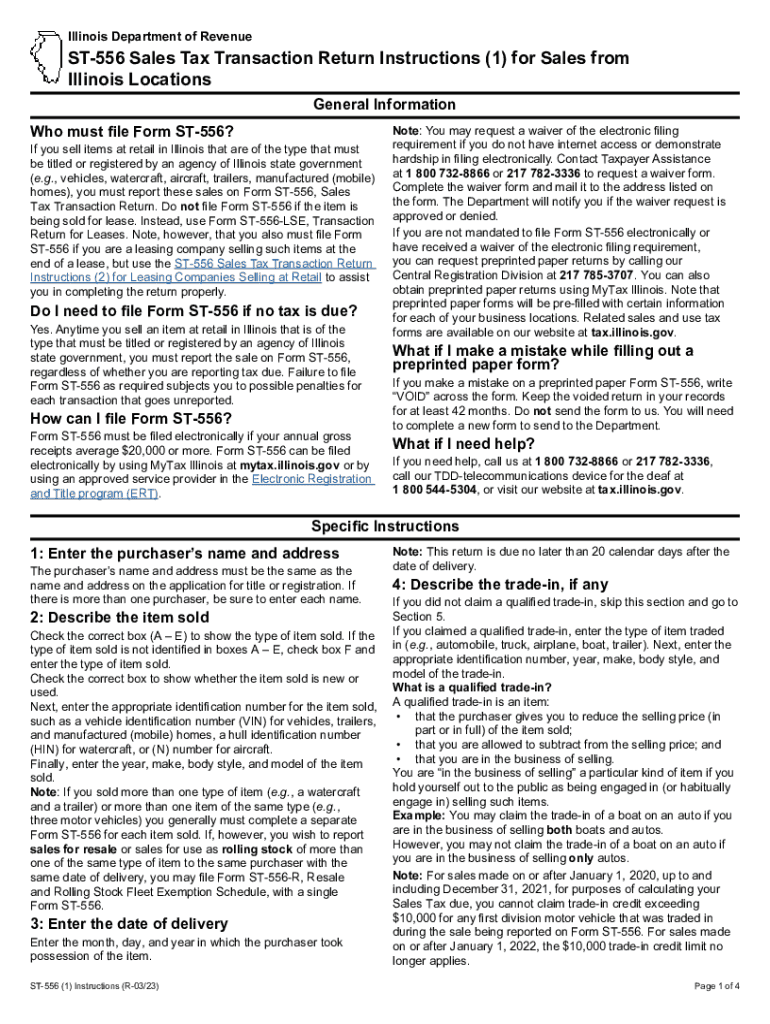
Such as a vehicle identification number (VIN) for vehicles, trailers, and manufactured (mobile) homes, a hull identification number (HIN) for watercraft, or (N) number for aircraft. Finally, enter the year, make, body style, and model of the item sold. Note: If you sold more than one type of item (e.g., a watercraft and a trailer) or more than one item of the same type (e.g., three motor vehicles) you generally must complete a separate Form ST-556 for each item sold. If, however, you wish to re.

Open form follow the instructions

Easily sign the form with your finger

Send filled & signed form or save
How to fill out the St 556 Form online
This guide provides clear and comprehensive instructions for completing the St 556 Form online. It is essential for anyone selling items in Illinois that require state government titling or registration, ensuring compliance with tax requirements.
Follow the steps to complete the St 556 Form online.
- Click ‘Get Form’ button to obtain the St 556 Form and open it for online editing.
- Enter the purchaser's name and address, ensuring it matches the application for title or registration. If there are multiple purchasers, include each name.
- Describe the item sold by checking the appropriate box (A – E) for the type of item. If it’s not listed, check box F and specify. Indicate if the item is new or used, then provide the identification number (like VIN or HIN), and enter the year, make, body style, and model.
- Input the date of delivery by entering the month, day, and year when the purchaser took possession of the item.
- If applicable, describe any trade-in items by entering their type and relevant identification information. Include any specifics regarding trade-in qualifications.
- If the sale is exempt, indicate the relevant checkbox (A – F) based on exemption criteria. Follow with the necessary documentation required for each exemption type.
- Enter the price of the item sold along with any additional costs including accessories, taxes, and fees. Round to the nearest dollar as needed.
- Determine and calculate any applicable taxes based on the amount entered. Consider location-specific tax rates if necessary.
- Complete any final adjustments, including entering any applicable credits or corrections.
- Sign the return, ensuring both the seller and all purchasers provide their signatures where required.
- Review the completed form and save changes, download the document, or prepare to print it for submission.
Complete your St 556 Form online today to ensure accurate sales reporting.
Experience a faster way to fill out and sign forms on the web. Access the most extensive library of templates available.
Related content
Alternatively, you can obtain ST-556 forms preprinted for each of your business locations...
Forms ST-556, Sales Tax Transaction Return, and RUT-25, Vehicle Use Tax Transaction...
by G Statements · 2012 — Purpose: The purpose of this Guideline is to provide guidance...
Get answers to your most pressing questions about US Legal Forms API.
How do I claim sales tax refund in Illinois?
You should file Form ST-6, Claim for Sales and Use Tax Overpayment/Request for Action on a Credit Memorandum, if you are a registered retailer who has • a sales and use tax overpayment on file and you want to - convert this overpayment to a credit memorandum, or - convert it to a credit memorandum and transfer ...
Where do I file my Illinois state tax return?
Use MyTax Illinois to electronically file your original Individual Income Tax Return. It's easy, free, and you will get your refund faster.
How do I register for sales tax in Illinois?
Register faster using MyTax Illinois, our online account management program, available at mytax.illinois.gov. If you have questions, visit our website at tax.illinois.gov or call us weekdays between 8:00 a.m. and 4:30 p.m. at 217 785-3707.
How do I get a copy of my Illinois business License?
MyTax Illinois is the primary method you should use to obtain and print a copy of your Certificate of Registration or License.
How do I apply for tax-exempt status in Illinois?
To apply for an Illinois sales tax exemption number, your organization should submit Form STAX-1, Application for Sales Tax Exemption, or Apply for or Renew a Sales Tax Exemption online using MyTax Illinois.
What requires sales tax in Illinois?
Illinois' general state retailers' occupation and use tax rates are: 6.25 percent on general merchandise, including items required to be titled or registered by an agency of Illinois state government; and. 1 percent on qualifying foods, drugs, and medical appliances.
What is Illinois Department of Revenue official form ST 556?
If you sell items at retail in Illinois that are of the type that must be titled or registered by an agency of Illinois state government (e.g., vehicles, watercraft, aircraft, trailers, manufactured (mobile) homes), you must report these sales on Form ST‑556, Sales Tax Transaction Return.
How do I file a sales tax return in Illinois?
You have three options for filing and paying your Illinois sales tax: File online – File online at MyTax Illinois. You can remit your state sales tax payment through their online system. File by mail – You can use Form ST-1 and file and pay through the mail. AutoFile – Let TaxJar file your sales tax for you.
Use professional pre-built templates to fill in and sign documents online faster. Get access to thousands of forms.
If you believe that this page should be taken down, please follow our DMCA take down process here.