Loading
Get Nc Mvr-4 2020-2026
How it works
-

Open form follow the instructions
-

Easily sign the form with your finger
-

Send filled & signed form or save
How to fill out the NC MVR-4 online
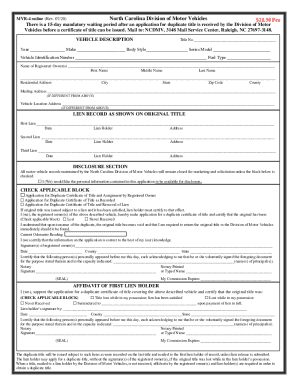
The NC MVR-4 form is essential for individuals seeking a duplicate certificate of title for their vehicle in North Carolina. This guide provides clear, step-by-step instructions on how to complete the form online, ensuring that all required details are filled in accurately and efficiently.
Follow the steps to fill out the NC MVR-4 online.
- Click ‘Get Form’ button to obtain the form and open it in the editor.
- Enter the title number in the designated field.
- Provide the vehicle information, including the year, make, body style, series model, and vehicle identification number. Additionally, specify the fuel type.
- List the names of the registered owner(s), including the first name, middle name, and last name.
- Input the residential address, including city, state, zip code, and county in the corresponding fields.
- If different, complete the mailing address section with the necessary information.
- If applicable, input the vehicle location address, again indicating if it differs from the residential address.
- Record any lien information that appears on the original title, including up to three liens, their dates, lien holders, and addresses as necessary.
- Review the disclosure section. If you wish to make your information available for disclosure, check the appropriate box.
- Choose the applicable block based on your reason for applying, such as duplicate certificate of title or lien removal.
- Indicate if the original title was never received, lost, or any other status as specified.
- Enter the current odometer reading accurately.
- Have all registered owners sign and date the form. Ensure the signatures are legible.
- If required, complete the notary section, certifying the signature appearances and providing their printed name.
- Finally, review all entered information, then save your changes. You can choose to download, print, or share the completed form.
Complete your documents online today for a smooth submission process.