Loading
Get Fl Dr-490port 2023-2026
How it works
-

Open form follow the instructions
-

Easily sign the form with your finger
-

Send filled & signed form or save
How to fill out the FL DR-490PORT online
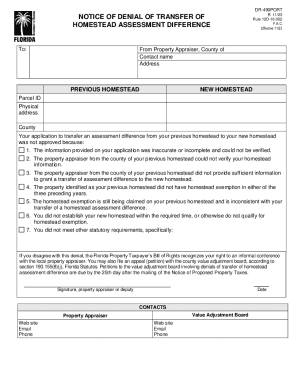
The FL DR-490PORT form is crucial for individuals looking to address the denial of their transfer of homestead assessment difference. This guide will help you navigate the essential components of the form and provide step-by-step instructions to complete it online.
Follow the steps to accurately complete the FL DR-490PORT online.
- Click the ‘Get Form’ button to access the online version of the FL DR-490PORT form.
- Begin by entering your contact information, including your name, address, and the county of your new homestead. This information is necessary for the property appraiser to identify you.
- Next, fill in the details of your previous homestead. You will need to provide the parcel ID and the physical address of your previous property. Ensure the accuracy of the information you provide to avoid further complications.
- In this section, describe the reasons for the denial of your homestead transfer. You may need to reference specific points from the list of reasons provided in the form regarding the denial.
- After detailing the denial reasons, you can include any additional comments or information that might support your case. This can be helpful if you plan to appeal the decision.
- Finally, review all the information you have entered for accuracy. Ensure that you have completed all required fields before submitting the form.
- Once you have confirmed that all information is correct, save your changes, and choose whether to download or print the completed form as needed. You may also share it electronically if preferred.
Take action now by completing your FL DR-490PORT form online to ensure your homestead assessment concerns are addressed.