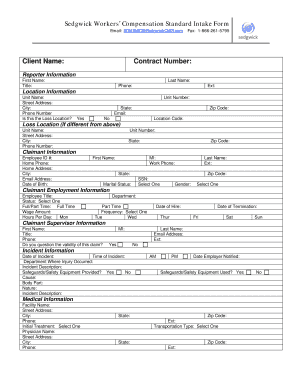
Ext: Location Information Unit Name: Street Address: City: Phone Number Is this the Loss Location? Unit Number: State: Email: Yes Zip Code: No Location Code: Loss Location (If different from above) Unit Name: Street Address: City: Phone Number: Unit Number: State: Zip Code: Claimant Information Employee ID #: Home Phone: Home Address: City: Email Address: Date of Birth: First Name: MI: Work Phone: Last Name: Ext: State: Zip Code: SSN: Select One Marital Status: Gender: Select On.

How it works
  • Open form

    Open form follow the instructions

  • Easily sign form

    Easily sign the form with your finger

  • Share form

    Send filled & signed form or save

How to fill out the Sedgwick Workers Compensation Standard Intake Form online

The Sedgwick Workers Compensation Standard Intake Form is an essential document for reporting workplace injuries and initiating claims. This guide will provide clear, step-by-step instructions on how to complete the form online, ensuring a smooth and efficient process for all users.

Follow the steps to complete your intake form online

  1. Press the ‘Get Form’ button to access the intake form and open it in your digital interface.
  2. Begin by entering the client name and contract number at the top of the form.
  3. Provide the reporter information, including first name, last name, title, phone number, and extension.
  4. Fill in the location information. Enter details such as unit name, street address, city, phone number, state, and zip code. Indicate whether this is the loss location.
  5. If the loss location is different, fill in the corresponding fields for loss location information.
  6. For claimant information, input the employee ID number, home phone, home address, email address, date of birth, and full name.
  7. Complete the claimant employment information section, including employee title, work status, wage amount, and hours worked per day.
  8. Provide the claimant supervisor information, including their first name, last name, title, phone number, email address, and check the question related to the validity of the claim.
  9. Document incident information by detailing the date and time of the incident, department, description of the incident, and whether safeguards or safety equipment were provided.
  10. Fill in the medical information if treatment was received, including facility name, physician name, and transportation type.
  11. Input any witness information, including their name and contact details.
  12. In the lost time information section, indicate if the claimant will miss work, the last date worked, and if salary will continue.
  13. Finally, review all entered information for accuracy. Save your changes, and utilize the options to download, print, or share the form as needed.

Complete your Sedgwick Workers Compensation Standard Intake Form online today for a seamless filing experience.

Get form

Experience a faster way to fill out and sign forms on the web. Access the most extensive library of templates available.

Related content

Judicial Branch Workers' Compensation Program...

Settlement requests shall be submitted using the JBWCP standardized SAR form. Each request...

Learn more
2022 Worker's Compensation Institute

employer is a workers' compensation claims processing company, Sedgwick Claims Management...

Learn more
Older Drivers

evaluations, driver rehabilitation, and vehicle modifications are States workers'...

Learn more
Questions & Answers

Get answers to your most pressing questions about US Legal Forms API.

Contact support

How do you call Sedgwick?

Call Sedgwick CMS at 1-800-416-1808. Outside the U.S. Injured at Work? If you are injured while at work, you should notify your supervisor immediately and file a Workers' Compensation claim.

Sedgwick pays $1.13 million to settle California comp violations.

Through our whole health model, Sedgwick is the first to integrate and simplify administration of health, workers' compensation, disability and leave benefits, linking data and resources through a single point of contact to help promote physical, emotional and financial well-being in the workforce.

How will I be paid while I am off of work due to a disability? If your claim is ACCEPTED by Sedgwick: Sedgwick will send you a disability (TD) check every two weeks. You can use your Sick Leave (Option A) or your Sick Leave and Vacation Leave (Option B) to supplement the TD check up to 100% of your regular earnings.

Customer Support. As a service to our clients, viaOne product support is available via e-mail at the following address:Help@sedgwickcms.com. Please include your phone number along with a description of your needs in the body of your e-mail.

How Long Does it Take to Get a Settlement Check from Sedgwick? Once the settlement and final release agreement is fully signed and returned, you can expect to get a settlement check from Sedgwick in about 4-6 weeks. This time frame can sometimes be longer depending on certain circumstances.

If a claim is delayed, Sedgwick CMS has up to 90 days from the date of the claim to accept or deny a claim. You will receive written notification of the decision. Reports normally take 30-45 days to be reviewed by Sedgwick CMS. industrially related (arises out of or in the course of employment).

By registering for mySedgwick, you can check the status of your claim, view payment history, or update information about your claim.

Get This Form Now!

Use professional pre-built templates to fill in and sign documents online faster. Get access to thousands of forms.

If you believe that this page should be taken down, please follow our DMCA take down process here.

Get Sedgwick Workers Compensation Standard Intake Form