Loading
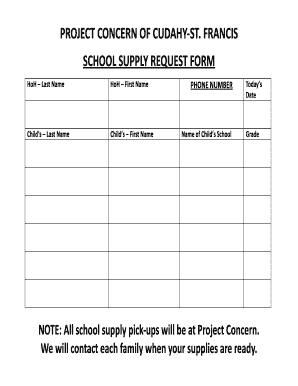
Get Wi Project Concern Cudahy/st. Francis School Supply Request Form 2016-2026
How it works
-

Open form follow the instructions
-

Easily sign the form with your finger
-

Send filled & signed form or save
How to fill out the WI Project Concern Cudahy/St. Francis School Supply Request Form online
This guide provides you with clear instructions on how to effectively complete the WI Project Concern Cudahy/St. Francis School Supply Request Form online. By following the outlined steps, you will navigate the form with ease and ensure all necessary information is provided accurately.
Follow the steps to fill out the form successfully.
- Click ‘Get Form’ button to access the form and open it in your preferred editor.
- Enter the last name of the head of household (HoH) in the designated field. Make sure this is spelled correctly to avoid any discrepancies.
- Input the first name of the head of household (HoH) in the provided field. Double-check the spelling for accuracy.
- Fill in the last name of the child who will be receiving school supplies. Ensure that this name matches any official school documents.
- Add the first name of the child in the specified field. Verify the name to ensure it is correct.
- Provide a phone number where you can be reached. This will be important for communication regarding the supply pick-up.
- Select the name of the child’s school from the list. This information is vital for ensuring the supplies are allocated correctly.
- Indicate today’s date in the appropriate field. This should reflect the current date when you are completing the form.
- Specify the child's grade in the relevant section. This will help in organizing the supplies according to the educational requirements for that grade.
- Review all the information you have entered for accuracy. Make necessary corrections if needed.
- Finally, save your changes, and consider downloading, printing, or sharing the completed form as needed.
Complete your school supply request form online today to secure the supplies your child needs!