Loading
Form preview
  • US Legal Forms
  • Other Templates
  • More Forms
  • More Multi-State Forms
  • Ut Spine Medicine Hipaa Email Consent 2018

Get Ut Spine Medicine Hipaa Email Consent 2018-2026

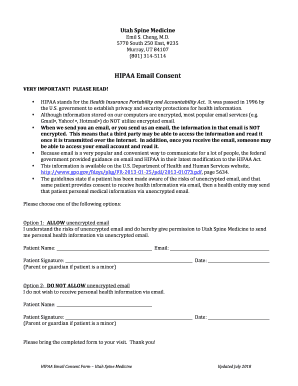
Untability Act. It was passed in 1996 by the U.S. government to establish privacy and security protections for health information. Although information stored on our computers are encrypted, most popular email services (e.g. Gmail , Yahoo! , Hotmail ) do NOT utilize encrypted email. When we send you an email, or you send us an email, the information in that email is NOT encrypted. This means that a third party may be able to access the information and read it once it is transmitted over the.

How it works

  1. Open form

    Open form follow the instructions

  2. Easily sign form

    Easily sign the form with your finger

  3. Share form

    Send filled & signed form or save

How to fill out the UT Spine Medicine HIPAA Email Consent online

Filling out the UT Spine Medicine HIPAA Email Consent form is an important step to ensure that your health information can be communicated securely and effectively. This guide will take you through the process step-by-step, making it straightforward and user-friendly.

Follow the steps to complete your HIPAA email consent form.

  1. Click ‘Get Form’ button to access the HIPAA Email Consent form and open it in your editing workspace.
  2. Review the information provided about HIPAA and understand the associated risks of using unencrypted email for receiving personal health information.
  3. Select one of the two options: Option 1 to allow unencrypted email communications or Option 2 to decline. Make sure to consider your comfort level with the associated risks.
  4. In the designated space under the chosen option, fill in your name and email address if you opted to allow unencrypted email.
  5. Provide your signature in the space provided. If you are completing this form for a minor, ensure that a parent or guardian signs.
  6. Include the date of completion in the provided field.
  7. Once all fields are completed, save your changes. Options may include downloading, printing, or sharing the completed form for your records.

Complete your HIPAA Email Consent form online today to secure communication with UT Spine Medicine.

Get form

Experience a faster way to fill out and sign forms on the web. Access the most extensive library of templates available.
Get form

Related content

271-Does a physician need a patient's written...
Dec 19, 2002 — Answer: No. The HIPAA Privacy Rule permits a health care provider to...
Learn more
The University of Texas System Evidence of...
This authorization is voluntary and that my signature is required in order for Dearborn...
Learn more
Science Board Meeting Transcript- April 23, 2018
Apr 23, 2018 — Med Watch form appropriately. There were some videos. 18 made and ... how...
Learn more

Related links form

TreasuryDirect FS 1851 2018 TreasuryDirect FS 1851 2014 TreasuryDirect FS 4000 2019 TreasuryDirect FS 4000 2018

Questions & Answers

Get answers to your most pressing questions about US Legal Forms API.

Contact support

So, what does HIPAA say about email? Technically, HIPAA doesn't say anything about email, but it does state that all electronic communication of PHI must be encrypted in transit—meaning, it must be secure on the way from one party to another.

Feb 08, 2023 Doctors, nurses, or employees who use Gmail to share sensitive data are more likely than others to have their sensitive data compromised. To protect your business from being non-compliant with federal HIPAA (Health Insurance Portability and Accountability Act) law, you need to have a proper plan in place.

It is not a HIPAA violation to email medical records provided the communication is permitted by the Privacy Rule, that safeguards are in place to comply with the Security Rule, and – if emailing medical records to a patient – that the patient has consented to receiving ePHI by email.

HIPAA compliance demands that therapists must check and double check the address to which they send an email each and every time. Some clients may copy other people, such as parents or partners, on emails to therapists. Never hit “reply all” unless the client has specifically asked that you do otherwise.

Essentially, any personal data that is connected to an individual's health condition automatically becomes PHI. This means that a patient's email address could be considered PHI if it is linked to a health condition or treatment.

Sending PHI via unencrypted email does not violate HIPAA, but Covered Entities and Business Associates must take reasonable steps to ensure the patient understands and acknowledges the risk of unsecured email transmission.

Patient emails ing to the HHS, the healthcare provider can assume (unless the patient has explicitly stated otherwise) that email communications are acceptable to the individual. Providers should assume the patient is not aware of the possible risks of using unencrypted email.

Four steps to send HIPAA compliant emails Secure patient information in transit and at rest. ... Enter into a Business associate agreement. ... Set up policies and procedures. ... Train your staff on secure email best practices.

Get This Form Now!

Use professional pre-built templates to fill in and sign documents online faster. Get access to thousands of forms.
Get form
If you believe that this page should be taken down, please follow our DMCA take down processhere.
Get UT Spine Medicine HIPAA Email Consent
Get form
  • Adoption
  • Bankruptcy
  • Contractors
  • Divorce
  • Home Sales
  • Employment
  • Identity Theft
  • Incorporation
  • Landlord Tenant
  • Living Trust
  • Name Change
  • Personal Planning
  • Small Business
  • Wills & Estates
  • Packages A-Z
  • Affidavits
  • Bankruptcy
  • Bill of Sale
  • Corporate - LLC
  • Divorce
  • Employment
  • Identity Theft
  • Internet Technology
  • Landlord Tenant
  • Living Wills
  • Name Change
  • Power of Attorney
  • Real Estate
  • Small Estates
  • Wills
  • All Forms
  • Forms A-Z
  • Other Templates
  • Legal Hub
  • About Us
  • Help Portal
  • Legal Resources
  • Blog
  • Affiliates
  • Contact Us
  • Delete My Account
  • Site Map
  • Industries
  • Forms in Spanish
  • Localized Forms
  • State-specific Forms
  • Forms Kit
  • Real Estate Handbook
  • All Guides
  • Notarize
  • Incorporation services
  • For Consumers
  • For Small Business
  • For Attorneys
  • USLegal
  • FormsPass
  • pdfFiller
  • signNow
  • altaFlow
  • DocHub
  • Instapage
Form Packages
  • Adoption
  • Bankruptcy
  • Contractors
  • Divorce
  • Home Sales
  • Employment
  • Identity Theft
  • Incorporation
  • Landlord Tenant
  • Living Trust
  • Name Change
  • Personal Planning
  • Small Business
  • Wills & Estates
  • Packages A-Z
Form Categories
  • Affidavits
  • Bankruptcy
  • Bill of Sale
  • Corporate - LLC
  • Divorce
  • Employment
  • Identity Theft
  • Internet Technology
  • Landlord Tenant
  • Living Wills
  • Name Change
  • Power of Attorney
  • Real Estate
  • Small Estates
  • Wills
  • All Forms
  • Forms A-Z
  • Other Templates
Customer Service
  • Legal Hub
  • About Us
  • Help Portal
  • Legal Resources
  • Blog
  • Affiliates
  • Contact Us
  • Delete My Account
  • Site Map
  • Industries
  • Forms in Spanish
  • Localized Forms
  • State-specific Forms
  • Forms Kit
Legal Guides
  • Real Estate Handbook
  • All Guides
Prepared for you
  • Notarize
  • Incorporation services
Our Customers
  • For Consumers
  • For Small Business
  • For Attorneys
Our Sites
  • USLegal
  • FormsPass
  • pdfFiller
  • signNow
  • altaFlow
  • DocHub
  • Instapage
Social Media
Call us now toll free:
+1 833 426 79 33
As seen in:
© Copyright 1999-2026 airSlate Legal Forms, Inc. 17 Station Street, Ste. 203, Brookline, MA 02445
  • Your Privacy Choices
  • Terms of Service
  • Privacy Notice
  • Content Takedown Policy
  • Bug Bounty Program