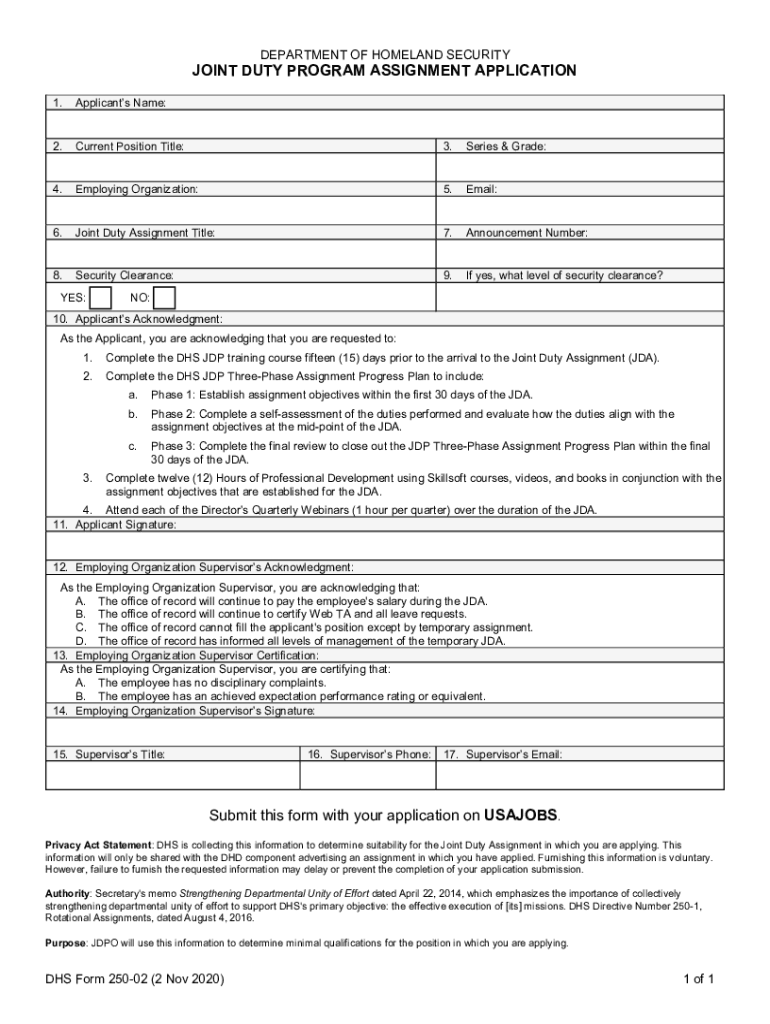
DEPARTMENT OF HOMELAND SECURITYJOINT DUTY PROGRAM ASSIGNMENT APPLICATION 1. Applicants Name:2. Current Position Title:3. Series & Grade:4. Employing Organization:5. Email:6. Joint Duty Assignment.
Loading

Open form follow the instructions

Easily sign the form with your finger

Send filled & signed form or save
How to fill out the DHS Form 250-02 online
This guide provides a clear and supportive framework for filling out the DHS Form 250-02 online. Follow these steps to ensure that your application for the Joint Duty Program Assignment is completed accurately and effectively.
Follow the steps to successfully complete the DHS Form 250-02 online
- Click the ‘Get Form’ button to obtain the document and open it in your preferred editor.
- Begin by filling in your applicant’s name in the designated field to ensure your application is properly identified.
- Enter your current position title in the following section, providing clarity on your professional role.
- Input your series and grade in the next field, which helps categorize your position within the organization.
- Provide the name of your employing organization in the next section to confirm your current workplace.
- Enter your email address for communication purposes throughout the application process.
- Fill in the title of the Joint Duty Assignment you are applying for, as specified in the announcement.
- Indicate the announcement number related to the Joint Duty Assignment application to connect your application with its corresponding listing.
- Select your security clearance status by marking 'Yes' or 'No' in the corresponding section.
- If you have security clearance, specify the level of clearance in the designated area.
- Acknowledge the applicant's responsibilities by confirming that you have read and agree to complete the required training and assignments outlined.
- Sign the application to verify your acknowledgment and authenticity.
- Supervisor acknowledgment is necessary; provide the supervisor’s acknowledgment details as required in the form.
- The supervisor must also certify the employee's disciplinary history and performance rating.
- Include the supervisor's signature to complete their acknowledgment.
- Enter the supervisor's title for identification purposes.
- Provide the supervisor's phone number and email address to facilitate communication.
- Once all details are filled, save your changes, download a copy, and print the form if necessary before submission.
Get started on your application by completing the DHS Form 250-02 online today!
Experience a faster way to fill out and sign forms on the web. Access the most extensive library of templates available.
Related content
Complete the DHS JDP Three-Phase Assignment Progress Plan to include: a. Phase 1:...
May 31, 2018 — Tufts University Human Factors Seminar (Medford, MA). Human Factors for...
... form the desired signal nets between the cells. FPGAs combine an abundance of logic...
Get answers to your most pressing questions about US Legal Forms API.
What does DHS stand for?
Image. The Department of Homeland Security (DHS) protects our country's borders and manages the flow of people and products into and out of the United States. Here are some of the ways they do this. Protecting U.S. Borders.
What is the intelligence community civilian joint duty program?
What is the Intelligence Community (IC) Joint Duty Program? The IC Joint Duty Program offers civilian intelligence professionals (GG-11 thru senior executive level) opportunities to broaden and enhance their skills by experiencing the Intelligence Community beyond their home element.
What is a DHS Form 250 02?
DHS Form 250-02 - Joint Duty Assignment Application Applicants must use DHS Form 250-02 to apply to an open DHS Joint Duty Assignment. Visit the Joint Duty Program website for more information. If you have questions, contact jointdutyprogramoffice@hq.dhs.gov .
What is a joint duty assignment?
The DHS Joint Duty Program is an intra- and inter-departmental program which offers civilian personnel professional and developmental opportunities. Joint duty assignments enhance operations and mission execution through unity of effort and collaboration.
What is joint duty credit?
Joint Duty credit is mandatory for promotion to Senior Executive in the IC, unless a waiver, for an individual, or an exemption, for a position, is obtained from the DNI or USD(I).
What is a DHS 250 02 form?
Applicants must use DHS Form 250-02 to apply to an open DHS Joint Duty Assignment. Visit the Joint Duty Program website for more information. If you have questions, contact jointdutyprogramoffice@hq.dhs.gov .
What form is required to be completed by all employees prior to departing DHS?
Explanation: The form required to be completed by all employees prior to departing DHS is Form 132-01, DHS Exit Checklist. This form ensures that employees have completed all necessary tasks and returned all company property before leaving the organization.
Use professional pre-built templates to fill in and sign documents online faster. Get access to thousands of forms.
If you believe that this page should be taken down, please follow our DMCA take down process here.