Loading
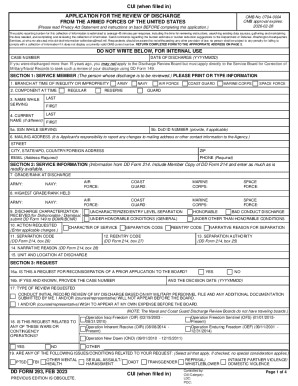
Get Send Comments Regarding The Burden Estimate Or Burden Reduction Suggestions To The Department Of
How it works
-

Open form follow the instructions
-

Easily sign the form with your finger
-

Send filled & signed form or save
How to use or fill out the Send Comments Regarding The Burden Estimate Or Burden Reduction Suggestions To The Department Of online
Filling out the Send Comments Regarding The Burden Estimate Or Burden Reduction Suggestions To The Department Of form can be straightforward with the right guidance. This document guide aims to assist you in completing the form accurately and effectively while ensuring that you adhere to the required standards.
Follow the steps to complete the form online.
- Click ‘Get Form’ button to access the form and open it in the online editor.
- Begin with Section 1, where you will provide information about the service member. Include the branch of service, component, and names while serving, ensuring everything is filled in clearly.
- In Section 2, gather and input the service member's military information, such as grade/rank at discharge and discharge characterization received. Be sure to have the DD Form 214 handy for reference.
- Proceed to Section 3, where you will detail the request being made. Indicate whether this is a request for reconsideration and specify the type of review requested. Ensure to mention any relevant operations and issues related to your request.
- In Section 4, list any supporting evidence and records that you are attaching to your application. This may include medical records and character references that validate your request.
- If applicable, complete Section 5 by providing the contact information for any representative or counsel authorized to communicate on behalf of the service member.
- In Section 6, the applicant must sign the document if they are not the service member. Indicate your relationship to the service member and ensure legal proof of death or incompetency is included if necessary.
- Finally, review all sections for accuracy, then save any changes, and you can choose to download, print, or share the form as needed. Ensure the form is submitted to the appropriate address based on the indicated branch of service.
Start filling out your form online today to ensure your comments and suggestions are submitted promptly.
Under the PRA, information collections approved by the Office of Management and Budget (OMB) are linked to OMB Burden Statements that explain more about the specific collection and who to contact for more information. The burden statement(s) below apply only to pre-approved NCI online opinion and feedback surveys.
Industry-leading security and compliance
US Legal Forms protects your data by complying with industry-specific security standards.
-
In businnes since 199725+ years providing professional legal documents.
-
Accredited businessGuarantees that a business meets BBB accreditation standards in the US and Canada.
-
Secured by BraintreeValidated Level 1 PCI DSS compliant payment gateway that accepts most major credit and debit card brands from across the globe.