Loading
Get Building Permit Application - City Of Otsego, Minnesota
How it works
-

Open form follow the instructions
-

Easily sign the form with your finger
-

Send filled & signed form or save
How to fill out the BUILDING PERMIT APPLICATION - City Of Otsego, Minnesota online
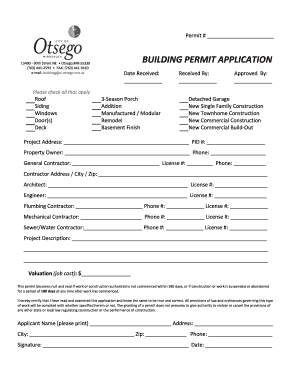
Filling out the building permit application for the City of Otsego online is an essential step for anyone looking to initiate construction or remodels. This guide will provide you with clear instructions to ensure the process is straightforward and efficient.
Follow the steps to complete your application online.
- Press the ‘Get Form’ button to access the building permit application form and open it in your preferred editing tool.
- Begin by entering the permit number in the designated field labeled 'Permit #'. This helps in tracking your application.
- Fill in the 'Date Received' field, which may be left blank if this is to be completed by the city staff.
- Complete the 'Received By' section if applicable; otherwise, this is typically for city personnel.
- In the 'Approved By' section, leave it blank for city staff to fill out once the application is reviewed.
- Indicate all relevant project types by checking the boxes next to the options that apply to your project, such as 'Roof' or 'New Single Family Construction'.
- Enter the 'Project Address' and the Property Identification Number (PID) in the respective fields.
- Fill in the 'Property Owner' details, followed by their phone number.
- Provide information for the general contractor, including their name, license number, and phone number.
- List the address, city, and zip code for the contractor.
- If applicable, enter the details of any architects or engineers involved along with their license numbers.
- Include the plumbing, mechanical, and sewer/water contractors' information, including their phone numbers and license numbers.
- Describe the project in detail in the 'Project Description' section, ensuring to highlight critical aspects.
- Enter the overall job cost under 'Valuation (job cost)'.
- Review the statement regarding the permit becoming void after 180 days of inactivity before proceeding.
- In the 'Applicant Name' field, print your name, and fill in your address, city, zip, and phone number.
- Sign and date the application at the indicated sections.
- Once all fields are completed, ensure to save your changes, and you may download, print, or share the filled-out form as needed.
Take the next step towards your project by completing the building permit application online today.
Generally mailed permit applications take approximately one week to process. Permit applications that require a zoning approval or a plan review (see the timeline below) may take up to three weeks or longer.
Industry-leading security and compliance
US Legal Forms protects your data by complying with industry-specific security standards.
-
In businnes since 199725+ years providing professional legal documents.
-
Accredited businessGuarantees that a business meets BBB accreditation standards in the US and Canada.
-
Secured by BraintreeValidated Level 1 PCI DSS compliant payment gateway that accepts most major credit and debit card brands from across the globe.