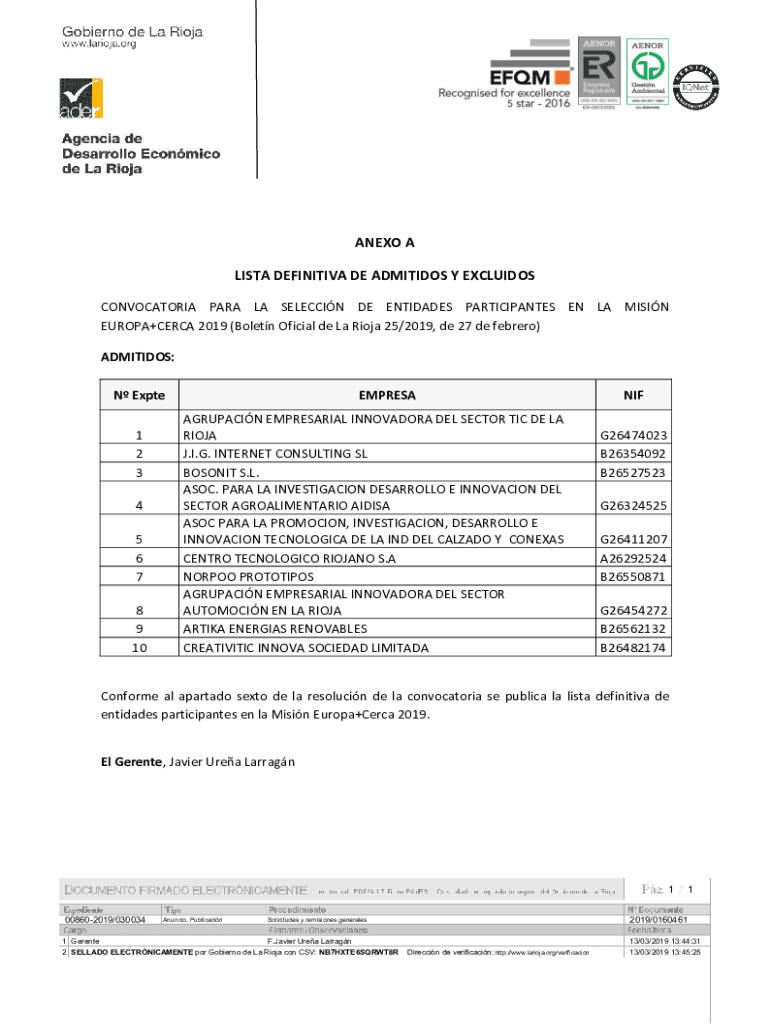
NEXT A LIST DEFINITIVE DE ADDITION Y EXCLUDES CONVOCATORIA PARA LA SELECTION DE ENFILADES PARTICIPANTS EN LA ISIN EUROPA+CIRCA 2019 (Boleyn Official de La Rioja 25/2019, DE 27 de Ferraro) ADDITION:.
Loading

Open form follow the instructions

Easily sign the form with your finger

Send filled & signed form or save
How to fill out the ES Ader Lista Definitiva De Admitidos Y Excluidos online
Filling out the ES Ader Lista Definitiva De Admitidos Y Excluidos form online can be a straightforward process. This guide will walk you through each step to ensure you complete the form accurately and efficiently.
Follow the steps to successfully complete the form online.
- Click ‘Get Form’ button to obtain the form and open it in your preferred editor.
- Begin by reviewing the general instructions provided within the form. It is crucial to understand the purpose and significance of the document before filling it out.
- In the 'Admitidos' section, you will see a list of admitted entities. Ensure that you reference the correct identification number (Nº Expte) associated with each entity.
- Fill in the corresponding fields with the required information regarding the entity, such as their official name, tax identification number (NIF), and any other specific details requested.
- If there is any section labeled 'Excluidos', follow the same process of reviewing and populating the fields as necessary, although this section may not apply if you are only dealing with admitted entities.
- After filling out all relevant sections, take a moment to review your entries for accuracy. Ensure that all information is complete and correctly formatted.
- Once you are satisfied with your entries, you can save your changes. You may also download the form for your records or to share with others if necessary. Additionally, remember to print a copy for any required submissions.
Complete your documents online with ease and confidence.
Experience a faster way to fill out and sign forms on the web. Access the most extensive library of templates available.
Related content
Oct 8, 2010 — La meta fundamental de ese ODM cuarto en la lista acordada por la ONU,...
438 [417,II,1-2]. A LUISA DE MARILLAC, EN ANGERS. París 11 de enero de 1640. Señorita:...
Lista de la biblioteca EQ; Lista de la biblioteca DYNAMICS (Dinámica); Parámetros de...
Use professional pre-built templates to fill in and sign documents online faster. Get access to thousands of forms.
If you believe that this page should be taken down, please follow our DMCA take down process here.