Loading
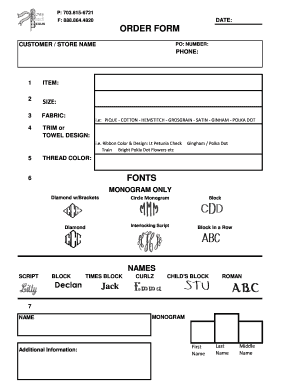
Get Va Bows And Beaus Gifts Order Form 2015-2026
How it works
-

Open form follow the instructions
-

Easily sign the form with your finger
-

Send filled & signed form or save
How to fill out the VA Bows And Beaus Gifts Order Form online
Filling out the VA Bows And Beaus Gifts Order Form online can be a straightforward process. This guide provides detailed instructions on completing each section of the form to ensure your order is processed smoothly.
Follow the steps to successfully complete your order form.
- Click ‘Get Form’ button to obtain the form and open it in the editor.
- Enter the customer or store name in the designated field at the top of the form. This helps identify who is placing the order.
- Provide your purchase order (PO) number, if applicable, to facilitate order tracking.
- Fill in your phone number to ensure you can be reached for any questions regarding your order.
- Specify the item you wish to order. This should be a clear description of the product.
- Indicate the desired size of the item by selecting from the available options.
- Select the fabric type for your item from the provided list, such as pique or cotton.
- Choose the trim or towel design you prefer, including options like hemstitch or grosgrain.
- Select your preferred thread color to personalize your order.
- Choose the font style for any monogram, such as block or script, by marking the appropriate section.
- Enter the names for the monogram in the designated fields. Provide the first, last, and middle name as needed.
- Review all filled sections to ensure accuracy before proceeding. Check for completeness and correctness in every field.
- Once you have verified all information, you can save changes, download, print, or share the completed form as required.
Complete your order form online today to secure your special gifts!