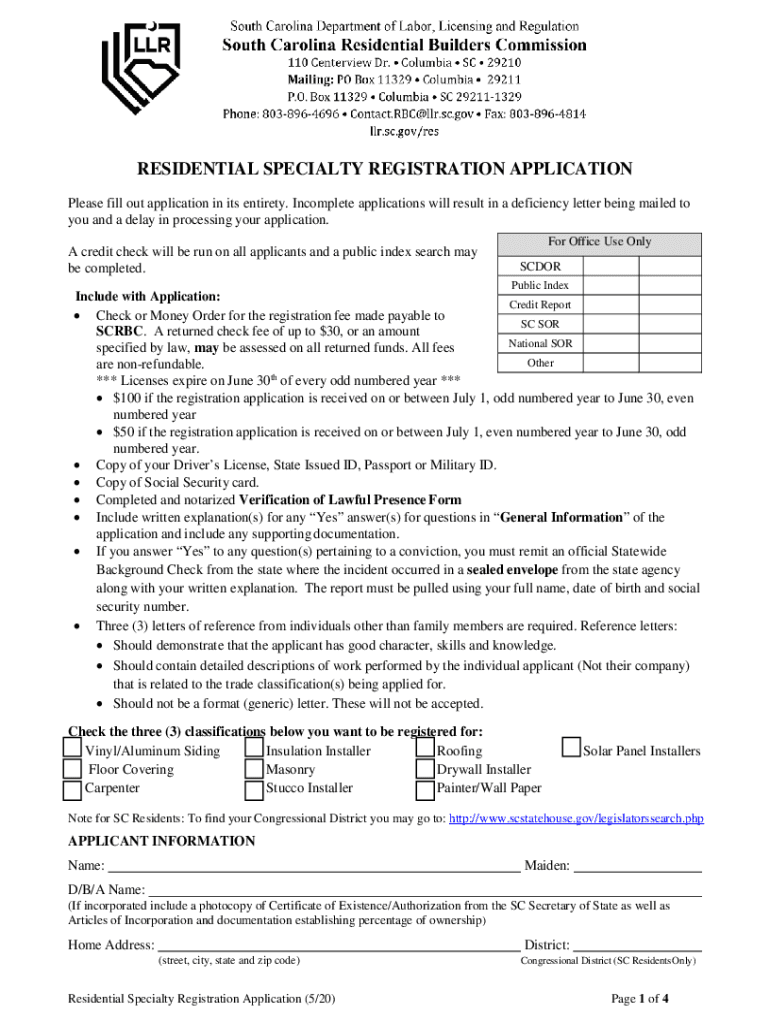
Your application. A credit check will be run on all applicants and a public index search may be completed. For Office Use Only SCDOR Public Index Include with Application: Credit Report Check or Money Order for the registration fee made payable to SC SOR SCRBC. A returned check fee of up to $30, or an amount National SOR specified by law, may be assessed on all returned funds. All fees Other are non-refundable. th *** Licenses expire on June 30 of every odd numbered year *** $100 if t.

Open form follow the instructions

Easily sign the form with your finger

Send filled & signed form or save
How to fill out the SC Residential Specialty Registration Application online
Filling out the South Carolina Residential Specialty Registration Application online can streamline your licensing process. This guide provides clear, step-by-step instructions to help you complete the application accurately and efficiently.
Follow the steps to fill out your application successfully.
- Press the ‘Get Form’ button to access the application form and open it for editing.
- Begin by filling out the applicant information section. Provide your full name, maiden name, and doing business as (D/B/A) name if applicable. Ensure you include your home address, mailing address (if different), county, date of birth, social security number, email address, and phone number.
- Complete the financial information section. If your undertaking will exceed $5,000, note the requirement for a surety bond and ensure it is an original signed document with the necessary power of attorney.
- In the business information section, check the appropriate box for your type of business entity and include your federal ID number. You will also need to list names and relevant details about principal owners or executive officers.
- Move on to the general information section. Answer all questions carefully, providing a written explanation for any 'Yes' answers along with necessary supporting documentation.
- In the work experience section, check the classifications you wish to register for and indicate the number of years of experience for each. Remember to prepare three letters of reference from individuals other than family members.
- Complete the verification of lawful presence form, selecting the appropriate box regarding your citizenship or immigration status and attaching any necessary documentation.
- Finally, review your application for completeness. Once all sections are filled, save your changes, and prepare to download, print, or share the application as needed.
Submit your SC Residential Specialty Registration Application online today to ensure a smooth licensing process.
Experience a faster way to fill out and sign forms on the web. Access the most extensive library of templates available.
Related content
Residential Specialty Contractor Registration Online Application Forms ... SC Standards of...
$260. B. Licensed Residential Specialty Contractors: Electrical, Heating and Air and...
Refer to www.trex.com for up-to-date installation and technical documents that may not be...
Get answers to your most pressing questions about US Legal Forms API.
What can a homeowner do without a permit in South Carolina?
A permit is required for most work / improvements (excluding some interior remodeling including painting, doors, papering, tiling, carpeting, cabinets, counter tops, and similar finish work).
What is a residential specialty contractor in South Carolina?
To paraphrase South Carolina Code of Laws 40-59-20, a residential specialty contractor is any individual or business entity that performs contract work requiring special skills such as plumbing, HVAC, or electrical services.
What requires a building permit in South Carolina?
City code says any owner or owner's authorized agent who intends to construct, enlarge, alter, repair, move, demolish or change the occupancy of a building or structure, or to erect, , enlarge, alter, repair, remove, convert or replace any electrical, gas, mechanical or plumbing system, the installation of which ...
How do I get a specialty contractor's license in SC?
How do I register as a residential specialty contractor in South Carolina? Complete the Residential Specialty Contractor Registration Application. The affidavit must have and display one year of experience. Specialty license(s) information can be found at Affidavit of Work Experience.
Can I build my own house in SC without a license?
The exemption allows you, as the owner of your property, to act as your own builder even though you do not have a license. You must supervise the construction yourself. You may build or improve a one-family or two-family residence. The building must be for your own use and occupancy.
Can a homeowner pull a building permit in South Carolina?
A: A homeowner can obtain a permit to perform construction on his own residence provided that the home is not offered for sale or rent for a period of two years.
How much work can you do without a contractor license in South Carolina?
General and mechanical contractors who want to work on commercial and industrial projects valued at over $5,000 need to carry a license (the license also allows them to work on residential jobs). These licenses fall under the control of the South Carolina Contractor's Licensing Board.
How do I become a residential contractor in South Carolina?
Here are the steps you'll need to take to become a licensed builder for residential projects in the state of South Carolina: File a written application. ... Submit a certified check. ... Submit an Affidavit. ... Pass the exam. ... Pay the license fee. ... Send the registration form. ... Prepare for the exam. ... Arrive at your appointment.
Use professional pre-built templates to fill in and sign documents online faster. Get access to thousands of forms.
If you believe that this page should be taken down, please follow our DMCA take down process here.