Loading
Get Manhattan College Transcript Request 2020-2026
How it works
-

Open form follow the instructions
-

Easily sign the form with your finger
-

Send filled & signed form or save
How to fill out the Manhattan College Transcript Request online
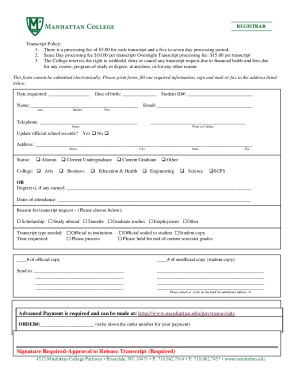
This guide provides a comprehensive overview of how to complete the Manhattan College Transcript Request form online. It details each component of the form, ensuring clarity and ease for all users regardless of their prior experience.
Follow the steps to successfully complete your transcript request
- Press the ‘Get Form’ button to retrieve the transcript request form and access it in your chosen document application.
- Begin by entering the date you are requesting the transcript in the designated ‘Date Requested’ field.
- Fill in your date of birth in the provided ‘Date of Birth’ space to help verify your identity.
- Enter your name in the ‘Name’ section, ensuring to include your last name and any maiden name if applicable.
- Input your student ID number in the corresponding field for accurate record identification.
- Provide your email address for correspondence related to your transcript request.
- List your telephone number in the allocated space, selecting either home, work, or cellular for contact purposes.
- Specify if you would like to update official school records by selecting ‘Yes’ or ‘No’.
- Fill in your current address, providing street, city, state, and zip code for delivery purposes.
- Indicate your status by checking the appropriate box, such as Alumni, Current Undergraduate, Current Graduate, or Other.
- If applicable, state your degree(s) earned in the section provided.
- Complete the ‘Dates of Attendance’ section to further clarify your enrollment history.
- Select the reason for your transcript request from the options provided.
- Choose the type of transcript you need by checking the appropriate box.
- Specify the number of official and unofficial copies required in their respective fields.
- Enter the send-to address, including any additional information on the back of the form if necessary.
- Remember to make the payment for your transcript request and write down the order number.
- Finally, sign the form to authorize the release of your transcript.
- Once completed, print the form and mail or fax it to the address listed below.
Start filling out your transcript request online today!
Transcripts can be ordered by letter, on-line (http://.getmytranscript.com ), or in person from the Office of the Registrar.