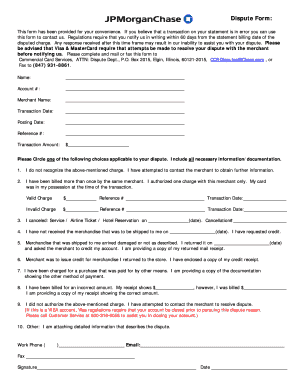
Dispute Form: This form has been provided for your convenience. If you believe that a transaction on your statement is in error you can use this form to contact us. Regulations require that you notify.
Loading
Open form follow the instructions
Easily sign the form with your finger
Send filled & signed form or save
How to fill out the IL JPMorgan Chase Dispute Form online
This guide will walk you through the process of completing the IL JPMorgan Chase Dispute Form online. By following these steps, you can ensure that your dispute is filed accurately and efficiently.
Follow the steps to successfully complete the form online:
- Press the ‘Get Form’ button to access the form and open it in the editor.
- Begin by entering your name in the provided field.
- Fill in your account number where indicated.
- Specify the merchant's name from which the disputed charge originated.
- Record the transaction date of the charge in the assigned area.
- Input the posting date of the transaction in the designated section.
- Provide the reference number associated with the transaction.
- Enter the transaction amount in the applicable field.
- Select one of the dispute reasons by circling the applicable choice and include all required information/documentation.
- Fill in your work phone number and email address in the respective fields.
- If applicable, include the fax number where you can be reached.
- Sign and date the form in the areas specified.
- Once completed, save your changes and consider your options to download, print, or share the form as necessary.
Complete your dispute form online today to ensure timely resolution.
Experience a faster way to fill out and sign forms on the web. Access the most extensive library of templates available.
Related content
Complete the on line dispute form available through. 1. the JPMorgan electronic access...
This form is to be used to report transactions on your statement that you believe are in...
Feb 1, 2021 — Part III incorporates information by reference to the registrant's...
Get answers to your most pressing questions about US Legal Forms API.
What is the address for Chase disputes?
You can do that by either writing to Chase at Customer Service, P.O. Box 15299, Wilmington, DE 19850-5299 or by signing into your online account and then: Going to “Things you can do” or clicking on the “More options” menu. Choosing “Account services” Clicking “Dispute a transaction”
How do I request a dispute with Chase?
Here's how: After signing in, find and select the transaction you are concerned about. Review the transaction details and click Dispute Transaction to start the process. Answer a few questions, review your responses and click Submit dispute. Track your dispute in the Account Menu under Account Services.
Where do I email a chase dispute form?
You can return it to us by one of the following methods: Fax it to the number found on the form for the quickest resolution. Mail it to the physical address on the form. Email it to Chase-cb@chase.com.
Does Chase refund disputed charges?
The easiest way to do this is to sign in at chase.com/business. STEP 3: If you submit proper documentation and successfully challenge the dispute in the necessary timeframe, the disputed funds will be returned to you.
How do I contact Chase by email?
Chase customer service does not have a public email address. The bank recommends that customers sign in to Chase Online and use the Secure Message Center to email their customer service department. Alternatively, customers can visit one of the bank's branches, or contact customer support by phone at (800) 935-9935.
How do I email Chase dispute documentation?
You can also email the documentation to chase-cb@chase.com.
Where do I send my chase dispute address?
You can do that by either writing to Chase at Customer Service, P.O. Box 15299, Wilmington, DE 19850-5299 or by signing into your online account and then: Going to “Things you can do” or clicking on the “More options” menu. Choosing “Account services” Clicking “Dispute a transaction”
How do I upload documents to Chase dispute?
Here's how: After signing in, find and select the transaction you are concerned about. Review the transaction details and click Dispute Transaction to start the process. Answer a few questions, review your responses and click Submit dispute. Track your dispute in the Account Menu under Account Services.
Use professional pre-built templates to fill in and sign documents online faster. Get access to thousands of forms.
If you believe that this page should be taken down, please follow our DMCA take down process here.