Loading
Get Va Nfpa 1001 2022-2026
How it works
-

Open form follow the instructions
-

Easily sign the form with your finger
-

Send filled & signed form or save
How to fill out the VA NFPA 1001 online
Filling out the VA NFPA 1001 form online can be a straightforward process when you understand each section and its requirements. This guide is designed to provide you with clear, step-by-step instructions on how to successfully complete the form.
Follow the steps to fill out the VA NFPA 1001 form online
- Press the ‘Get Form’ button to access the required form and open it in your selected editing application.
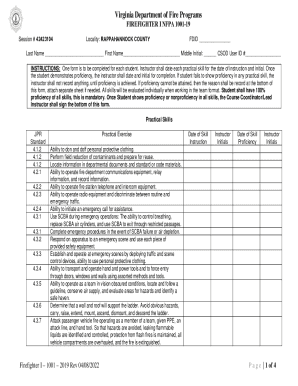
- Begin by entering your locality and FDID in the designated fields. This information identifies your location and department.
- Fill in your last name, first name, middle initial, and CSOD user ID number. Ensure that all information is accurate to avoid any issues during processing.
- Complete the Practical Skills section by noting the date of skill instruction. Each skill should be recorded individually along with the instructor's initials.
- As students demonstrate proficiency in each skill, the instructor must date and initial the corresponding field to confirm the completion.
- If a student does not demonstrate proficiency, do not record anything in that section until proficiency is achieved. If necessary, document the reason for non-proficiency at the bottom of the form.
- The Course Coordinator or Lead Instructor must sign the form upon completion, indicating that all skills have been evaluated.
- Once all sections are filled out and you have confirmed the accuracy of your entries, you can save your changes. The options to download, print, or share the form will be presented.
Complete your VA NFPA 1001 form online to ensure your skills are formally documented.