Loading
Get Fl Cf-es 3052a 2016
How it works
-

Open form follow the instructions
-

Easily sign the form with your finger
-

Send filled & signed form or save
How to fill out the FL CF-ES 3052A online
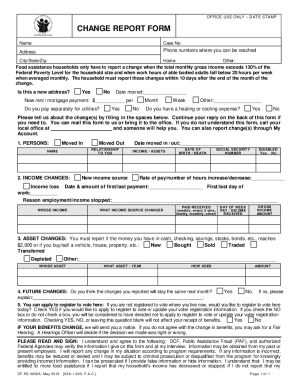
The FL CF-ES 3052A form is a critical document for reporting changes in your household's income or circumstances. Filling it out correctly ensures that your benefits are adjusted appropriately and in a timely manner.
Follow the steps to fill out the form online successfully.
- Click ‘Get Form’ button to access the FL CF-ES 3052A and open it for filling.
- Provide your name, case number, address, and phone numbers where you can be contacted. Ensure your contact information is accurate for any follow-up.
- Indicate if your address has changed by selecting 'Yes' or 'No'. If you have moved, enter the date of your move and your new rent or mortgage payment details.
- Answer whether you pay separately for utilities and if you have heating or cooling expenses by selecting 'Yes' or 'No'.
- Report any changes in your household by filling in the specified sections for persons who have moved in or out, including their names and relationships to you.
- Fill out the income changes section, detailing any loss of income or new income sources. Provide the rate of pay, number of hours worked, and the date & amount of any payments.
- Report on asset changes if applicable, including cash, savings, or property transactions.
- Indicate whether you expect the changes reported to remain the same next month.
- You will also have the option to apply to register to vote by indicating your preference.
- Read the agreement section carefully and provide your signature and the date of submission at the end of the form.
- Once you have completed all sections, save any changes made, and you can download, print, or share the filled form as needed.
Complete your FL CF-ES 3052A form online today to ensure your assistance reflects your current circumstances.
Get form
Experience a faster way to fill out and sign forms on the web. Access the most extensive library of templates available.
Send the following to the motor tax office: change of owner details (name /address), for pre 1993 vehicles use form RF100A, available from motor tax offices, or RF111 (do not complete the motor tax renewal details) available from motor tax offices, public libraries and garda stations.
Get This Form Now!
Use professional pre-built templates to fill in and sign documents online faster. Get access to thousands of forms.