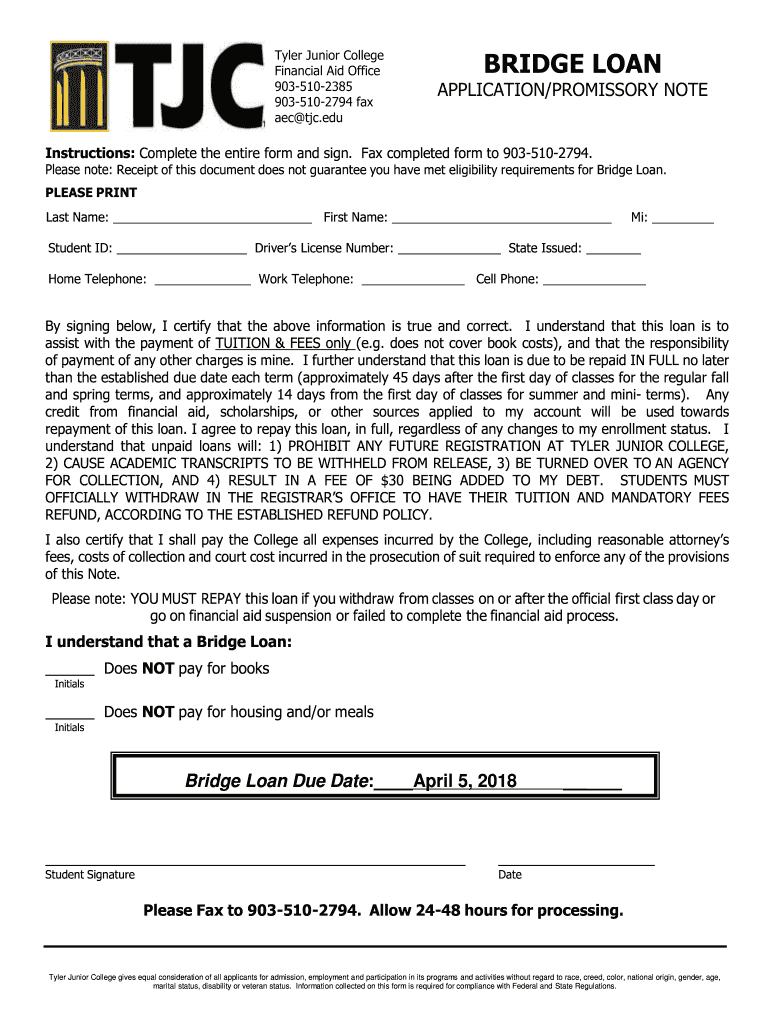
Tyler Junior College Financial Aid Office 9035102385 9035102794 fax AEC TJC. Elmbridge LOANAPPLICATION/PROMISSORY NOTEInstructions: Complete the entire form and sign. Fax completed form to 9035102794.
Loading

Open form follow the instructions

Easily sign the form with your finger

Send filled & signed form or save
How to fill out and sign Tyler Junior College Bridge Loan Application/Promissory Note online?
Get your online template and fill it in using progressive features. Enjoy smart fillable fields and interactivity.Follow the simple instructions below:
The prep of lawful paperwork can be expensive and time-ingesting. However, with our predesigned online templates, everything gets simpler. Now, working with a Tyler Junior College Bridge Loan Application/Promissory Note takes not more than 5 minutes. Our state web-based samples and clear instructions eradicate human-prone faults.
Adhere to our easy steps to get your Tyler Junior College Bridge Loan Application/Promissory Note prepared rapidly:
- Find the web sample from the library.
- Type all required information in the necessary fillable areas. The user-friendly drag&drop graphical user interface allows you to include or move areas.
- Check if everything is filled in correctly, without any typos or absent blocks.
- Use your electronic signature to the page.
- Simply click Done to save the adjustments.
- Download the record or print your copy.
- Submit immediately towards the receiver.
Make use of the fast search and advanced cloud editor to generate a correct Tyler Junior College Bridge Loan Application/Promissory Note. Remove the routine and create paperwork on the internet!
Tips on how to fill out, edit and sign Tyler Junior College Bridge Loan Application/Promissory Note online
How to fill and sign Tyler Junior College Bridge Loan Application/Promissory Note
Get your online template and fill it in using progressive features. Enjoy smart fillable fields and interactivity.Follow the simple instructions below:
The prep of lawful paperwork can be expensive and time-ingesting. However, with our predesigned online templates, everything gets simpler. Now, working with a Tyler Junior College Bridge Loan Application/Promissory Note takes not more than 5 minutes. Our state web-based samples and clear instructions eradicate human-prone faults.
Adhere to our easy steps to get your Tyler Junior College Bridge Loan Application/Promissory Note prepared rapidly:
- Find the web sample from the library.
- Type all required information in the necessary fillable areas. The user-friendly drag&drop graphical user interface allows you to include or move areas.
- Check if everything is filled in correctly, without any typos or absent blocks.
- Use your electronic signature to the page.
- Simply click Done to save the adjustments.
- Download the record or print your copy.
- Submit immediately towards the receiver.
Make use of the fast search and advanced cloud editor to generate a correct Tyler Junior College Bridge Loan Application/Promissory Note. Remove the routine and create paperwork on the internet!
How to edit Tyler Junior College Bridge Loan Application/Promissory Note
Take advantage of the usability of the multi-featured online editor while completing your Tyler Junior College Bridge Loan Application/Promissory Note. Use the diversity of tools to quickly complete the blanks and provide the required data in no time.
Preparing paperwork is time-taking and pricey unless you have ready-to-use fillable templates and complete them electronically. The simplest way to cope with the Tyler Junior College Bridge Loan Application/Promissory Note is to use our professional and multi-functional online editing solutions. We provide you with all the important tools for prompt form fill-out and allow you to make any adjustments to your templates, adapting them to any requirements. Besides that, you can make comments on the changes and leave notes for other parties involved.
Here’s what you can do with your Tyler Junior College Bridge Loan Application/Promissory Note in our editor:
- Complete the blank fields using Text, Cross, Check, Initials, Date, and Sign options.
- Highlight essential details with a favorite color or underline them.
- Conceal confidential information using the Blackout option or simply erase them.
- Add pictures to visualize your Tyler Junior College Bridge Loan Application/Promissory Note.
- Substitute the original text using the one corresponding with your needs.
- Leave comments or sticky notes to inform others about the updates.
- Create additional fillable fields and assign them to particular people.
- Protect the sample with watermarks, place dates, and bates numbers.
- Share the paperwork in various ways and save it on your device or the cloud in different formats after you finish adjusting.
Working with Tyler Junior College Bridge Loan Application/Promissory Note in our powerful online editor is the quickest and most effective way to manage, submit, and share your paperwork the way you need it from anywhere. The tool operates from the cloud so that you can access it from any location on any internet-connected device. All templates you create or fill out are securely kept in the cloud, so you can always open them whenever needed and be confident of not losing them. Stop wasting time on manual document completion and eliminate papers; make it all online with minimum effort.
How to fill and sign Tyler Junior College Bridge Loan Application/Promissory Note
Get your online template and fill it in using progressive features. Enjoy smart fillable fields and interactivity.Follow the simple instructions below:
The prep of lawful paperwork can be expensive and time-ingesting. However, with our predesigned online templates, everything gets simpler. Now, working with a Tyler Junior College Bridge Loan Application/Promissory Note takes not more than 5 minutes. Our state web-based samples and clear instructions eradicate human-prone faults.
Adhere to our easy steps to get your Tyler Junior College Bridge Loan Application/Promissory Note prepared rapidly:
- Find the web sample from the library.
- Type all required information in the necessary fillable areas. The user-friendly drag&drop graphical user interface allows you to include or move areas.
- Check if everything is filled in correctly, without any typos or absent blocks.
- Use your electronic signature to the page.
- Simply click Done to save the adjustments.
- Download the record or print your copy.
- Submit immediately towards the receiver.
Make use of the fast search and advanced cloud editor to generate a correct Tyler Junior College Bridge Loan Application/Promissory Note. Remove the routine and create paperwork on the internet!
Experience a faster way to fill out and sign forms on the web. Access the most extensive library of templates available.
Related content
(a) The Existing Credit Agreement shall be amended in the form of the Amended ... “Term...
APPLICATION/PROMISSORY NOTE ... Fax completed form to 903-510-2794. ... document does not...
Sep 3, 1990 — ed out its Emmies for community affairs programing at dinner ... broadcast...
Get answers to your most pressing questions about US Legal Forms API.
What is the federal school code for Tyler Junior College?
TJC's School Code is 003648. You'll need this code when you fill out the FAFSA app.
What time does TJC registrar office open?
Monday-Wednesday, Friday 8 a.m. - 5 p.m. | Thursday 8 a.m. - 7 p.m.
How do I withdraw from TJC?
You can drop a class by the drop date stated on the Academic Calendar by visiting the registrar's office in the Rogers Student Center, or call the registrar's office at 903-510-2401. Refunds are handled through the Business Office and are typically received in 4-6 weeks after withdrawal.
How do I appeal a TJC?
To request an appeal, an appeal worksheet must be completed and submitted with supporting documentation to the Business Services Office or to businessservices@tjc.edu. Appeal worksheets will not be considered complete if fields are blank or supporting documentation is not submitted.
How do I email TJC financial aid?
Please contact the Apache Enrollment Center if you need more information by calling 903-510-2385 or emailing aec@tjc.edu.
How do I log into my TJC email?
Frequently check your TJC email online via Apache Access. Click on the Email icon and then enter your login information again if necessary. This will take you to your TJC student Gmail account.
Use professional pre-built templates to fill in and sign documents online faster. Get access to thousands of forms.
If you believe that this page should be taken down, please follow our DMCA take down process here.