Loading
Get Ilife Pay Card
How it works
-

Open form follow the instructions
-

Easily sign the form with your finger
-

Send filled & signed form or save
How to fill out the Ilife Pay Card online
Filling out the Ilife Pay Card form is essential for managing your payments effectively. This guide provides clear instructions to help you through each section of the form online.
Follow the steps to complete your Ilife Pay Card application.
- Press the ‘Get Form’ button to access the Ilife Pay Card form and open it in your preferred editor.
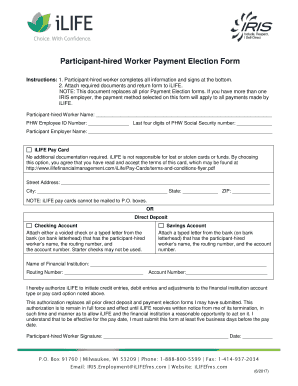
- Begin by entering your participant-hired worker name in the designated field indicated on the form.
- Provide your PHW employee ID number. Next, input the last four digits of your PHW Social Security number.
- Fill out the participant employer name in the respective area of the form.
- Choose your payment method: either the Ilife Pay Card or Direct Deposit. For the Ilife Pay Card option, enter your street address, city, state, and ZIP code, ensuring you do not use a P.O. box.
- If selecting Direct Deposit, indicate whether you prefer a checking or savings account. For checking accounts, attach a voided check or a bank letter with your name, routing number, and account number. For a savings account, include a bank letter meeting the same criteria.
- Enter the name of your financial institution, routing number, and account number as applicable.
- Read the authorization statement carefully. By signing, you authorize Ilife to initiate credit and debit entries to the specified account, agreeing that this authorization replaces all prior forms.
- Sign and date the form at the bottom, ensuring that your signature is legible.
- After filling out all sections, attach any required documents. Finally, save changes, download, print, or share the completed form as necessary.
Complete your Ilife Pay Card form online today to manage your payments effortlessly.