Loading
Get Labour & Birth Downtime Form
How it works
-

Open form follow the instructions
-

Easily sign the form with your finger
-

Send filled & signed form or save
How to fill out the LABOUR & BIRTH DOWNTIME FORM online
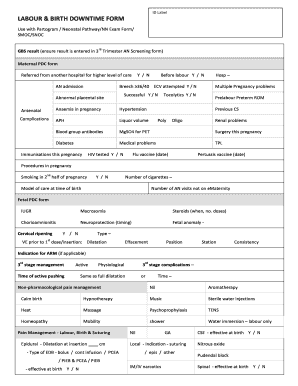
Filling out the Labour & Birth Downtime Form online is an important step in documenting the events and conditions surrounding the labour and birth process. This guide will walk you through each section of the form, providing clear, step-by-step instructions to help you complete it accurately and efficiently.
Follow the steps to fill out the form correctly.
- Click the ‘Get Form’ button to obtain the form and open it in your browser.
- Begin by entering the GBS result if applicable, ensuring that it is entered in the third trimester AN screening form as required.
- Indicate whether the maternal PDC form is available and if the individual was referred from another hospital for a higher level of care.
- Complete the section regarding pre-labour details, including any breech presentations and if an external cephalic version (ECV) was attempted and successful.
- Fill in the maternal medical history, noting any complications such as anaemia, hypertension, and diabetes, along with their treatment.
- Document any procedures or medications in labour, including assessments of fetal health and details about pain management techniques used.
- Provide birth details, including place of birth, presentation at birth, and type of birth, ensuring to list any instruments used in assisted delivery.
- After filling in all relevant sections, review the completed form carefully to ensure accuracy.
- Once you are satisfied with the information provided, you can save your changes, download, print, or share the completed form as required.
Complete your Labour & Birth Downtime Form online today for efficient documentation.
labour noun (WORK) practical work, especially when it involves hard physical effort: The car parts themselves are not expensive, it's the labour that costs the money.