Loading
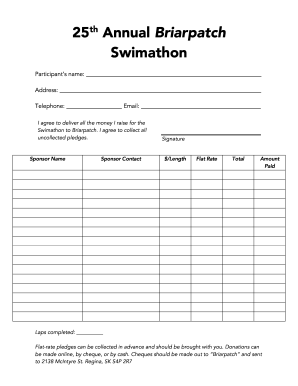
Get Canada 25th Annual Briarpatch Swimathon 2017-2026
How it works
-

Open form follow the instructions
-

Easily sign the form with your finger
-

Send filled & signed form or save
How to fill out the Canada 25th Annual Briarpatch Swimathon online
Completing the Canada 25th Annual Briarpatch Swimathon form online is a straightforward process. This guide will help you navigate each section and field of the form to ensure you submit all necessary information accurately.
Follow the steps to fill out the form effectively.
- Click ‘Get Form’ button to obtain the form and open it in the editor.
- Begin by entering your participant’s name in the designated field. Ensure that you provide your full name as it should appear on records.
- Next, fill in your address accurately. This should include your street address, city, province, and postal code.
- Provide your telephone number in the specified field. Include your area code to ensure proper contact.
- Enter your email address for better communication. Ensure it is a valid and frequently checked email.
- In the agreement section, check the box or write a note confirming your commitment to delivering all the funds raised for the Swimathon to Briarpatch.
- List your sponsors in the designated fields for ‘Sponsor Name’ and ‘Sponsor Contact.’ This ensures proper acknowledgment of their support.
- Sign the form where indicated to confirm your participation and agreement with the terms stated.
- If you are collecting pledges, fill in the total amount pledged and the amount you have already collected. Note that flat-rate pledges can be collected in advance.
- Complete the section for laps completed once the swimathon has taken place.
- Finally, save your changes, download or print the completed form for your records, or share it as needed.
Complete your form online today and make a splash for a great cause!