Loading
Get Mn Ps2441 2019-2026
How it works
-

Open form follow the instructions
-

Easily sign the form with your finger
-

Send filled & signed form or save
How to fill out the MN PS2441 online
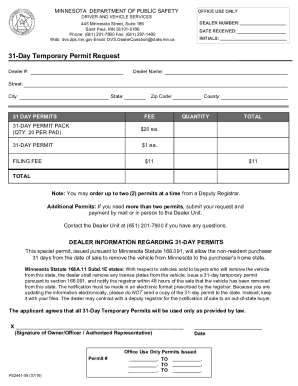
Completing the MN PS2441 form online can streamline your process for requesting a 31-day temporary permit. This guide will provide you with step-by-step instructions to ensure that you accurately fill out all necessary information on the form.
Follow the steps to successfully complete the MN PS2441 form.
- Click ‘Get Form’ button to retrieve the MN PS2441 and open it in your chosen editor.
- Begin by entering the dealer number in the designated field at the top of the form. This number identifies your dealer's registration with the Minnesota Department of Public Safety.
- Fill in the dealer name, street address, city, state, and zip code. Ensure that all information is accurate and matches your official records.
- Indicate the quantity of 31-day permits you wish to request. Remember, you can order up to two permits at a time. Specify either '31-day permit pack' or '31-day permit' based on your need.
- Calculate the total fee for your requested permits and enter it in the total field. The fee for a 31-day permit pack is $20 each, while a single permit costs $1.
- Select the county where you will be filing the form. This is important for processing your request accurately.
- Review the form for any errors or missing information. It is crucial to ensure that all entries are correct before submission.
- Once you have filled out the form, you can save your changes. If needed, you may also download, print, or share the form as required.
Complete your documents online today to ensure a smooth process!
Plates and stickers are obtained immediately from any License Center Location. To transfer a registration to Minnesota requires the vehicle title (if your title is with a lien holder or has been lost, your most recent registration card is sufficient).