Loading
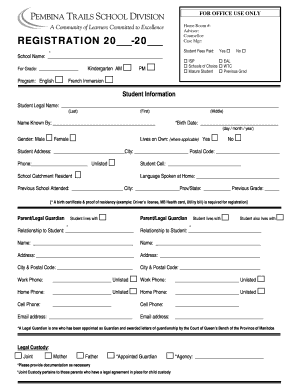
Get Registration Form - Pembina Trails School Division
How it works
-

Open form follow the instructions
-

Easily sign the form with your finger
-

Send filled & signed form or save
How to fill out the Registration Form - Pembina Trails School Division online
Completing the Registration Form for Pembina Trails School Division is an important step in enrolling your child in school. This guide provides clear, step-by-step instructions to help users fill out the form online with ease and confidence.
Follow the steps to complete your registration form accurately.
- Press ‘Get Form’ button to access the Registration Form and open it for editing.
- Fill in the school year in the designated section labeled 'Registration 20___-20___.' Indicate the school name and the grade for which you are registering your child.
- Select the program your child will be enrolled in, marking the appropriate box for options such as English, French Immersion, or others listed under 'Program.'
- Provide the student's legal name, including last name, first name, and middle name. Ensure accuracy in spelling.
- Input the name by which the student is commonly known and select the gender from the options provided.
- Enter the student’s birth date in the format of day/month/year and indicate whether the student lives independently.
- Provide the complete address of the student, including city and postal code, along with contact phone numbers and email addresses required for registration.
- For the parent or legal guardian sections, fill in all required fields including names, relationships to the student, addresses, and contact information.
- Indicate legal custody arrangements and provide necessary documentation as detailed in the form.
- Complete the residency status section and provide relevant information regarding the student’s immigration status, if applicable.
- Fill out the emergency contact information and include any siblings who are under 18 years of age.
- Complete the medical information section, specifying any health conditions or medications required by the student.
- Review and acknowledge policies regarding photos, media visits, and technology use by marking the appropriate boxes.
- If applicable, ensure signatures are obtained from both the student (if in Grade 9-12) and the parent or guardian along with the date.
- Once all fields are completed, save changes, and proceed to download, print, or share the form as needed.
Start the process of completing your registration form online today.