Loading
Get Brac Bank Rtgs Form
How it works
-

Open form follow the instructions
-

Easily sign the form with your finger
-

Send filled & signed form or save
How to fill out the Brac Bank Rtgs Form online
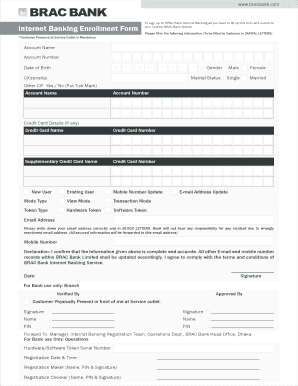
Filling out the Brac Bank Rtgs form online is a straightforward process that ensures your banking needs are addressed efficiently. This guide provides detailed instructions to help users accurately complete the form, making the online banking experience seamless.
Follow the steps to successfully complete the Brac Bank Rtgs Form.
- Click ‘Get Form’ button to obtain the form and open it in the editor.
- Begin by entering your account name in capital letters, as required by the form. Make sure the name matches your official bank records.
- Input your account number in the designated field. This is essential for identifying your banking account during processing.
- Fill in your date of birth using the specified format: day (D), month (M), and year (Y). Ensure accuracy as this information is vital for identity verification.
- Indicate your citizenship status by selecting the appropriate option from the list provided in the form.
- Choose your gender and marital status from the options available. Your selection should align with your official documents.
- If applicable, provide your credit card details, including the credit card name and number. Repeat for any supplementary cards if necessary.
- Specify whether you are a new or existing user of the banking service by checking the appropriate box.
- Update your mobile number if it has changed. This is important for communication and security purposes.
- Select your preferred mode type, whether view mode or transaction mode. This will determine what actions you can perform through internet banking.
- Choose the type of token you wish to use for online transactions, either hardware or software token.
- Enter your email address accurately in block letters. This is critical as all secured information will be sent to this address.
- Complete the declaration section confirming the accuracy of the information provided. Your signature and the date are required to finalize the form.
- Once all fields are completed, review your entries for accuracy. Then, save your changes, and proceed to download, print, or share the form as needed.
Start filling out the Brac Bank Rtgs Form online to manage your banking transactions efficiently.
A SWIFT code — sometimes also called a SWIFT number — is a standard format for Business Identifier Codes (BIC)....BRAC BANK LIMITED. SWIFT codeBRAKBDDHSwift code (8 characters)BRAKBDDHBranch nameBRAC BANK LIMITEDBranch addressTEJGAON GULSHAN LINK ROAD, 220/B, ANIK TOWER, FLOOR 11, TEJGAO4 more rows