Loading
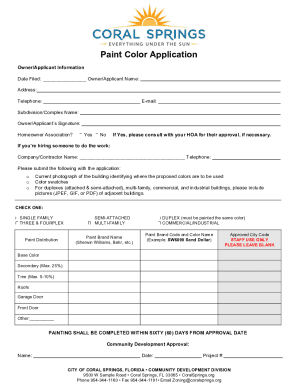
Get Fl Paint Color Application - City Of Coral Springs 2020-2025
How it works
-

Open form follow the instructions
-

Easily sign the form with your finger
-

Send filled & signed form or save
How to fill out the FL Paint Color Application - City Of Coral Springs online
This guide provides clear, step-by-step instructions for completing the FL Paint Color Application required by the City of Coral Springs. By following these instructions, you can ensure that your application is filled out correctly and submitted successfully.
Follow the steps to complete the application thoroughly.
- Click ‘Get Form’ button to access the FL Paint Color Application and open it in the editor.
- In the Owner/Applicant Information section, enter the date filed, your name, address, telephone number, and email. Make sure to provide complete and accurate information.
- Indicate the Subdivision or Complex Name where the property is located and sign the application. If applicable, check 'Yes' or 'No' regarding Homeowner Association approval.
- If you are hiring a contractor for the painting work, fill in the Company/Contractor Name and their telephone number.
- Prepare to submit the required documentation, including a current photograph of the building indicating where the proposed colors will be used, color swatches, and pictures of adjacent buildings for duplexes or multi-family structures.
- Select the appropriate type of building by checking one of the following options: Single Family, Duplex (must be painted the same color), Semi-Attached, Three & Fourplex, Multi-Family, or Commercial/Industrial.
- Fill in the Paint Brand Name (e.g., Sherwin Williams, Behr) and the specific Paint Brand Code and Color Name (e.g., SW6099 Sand Dollar).
- Specify the base color, secondary color (up to 25%), trim color (max. 5-10%), roof color, garage door color, front door color, and any other color specifications.
- Ensure all sections are complete, and remember that painting shall be completed within sixty (60) days from the approval date. Leave the section titled 'Staff Use Only’ blank.
- After reviewing your application for completeness, save any changes, and choose to download, print, or share the completed form as needed.
Complete your application online today for a seamless submission process.
If you're trying to create a secondary color, you'll need to combine two of your primary colors. Red and blue make purple, red and yellow make orange, and yellow and blue create green. The shade will be determined by the proportions or ratios of each primary color that you use in the mix.
Industry-leading security and compliance
US Legal Forms protects your data by complying with industry-specific security standards.
-
In businnes since 199725+ years providing professional legal documents.
-
Accredited businessGuarantees that a business meets BBB accreditation standards in the US and Canada.
-
Secured by BraintreeValidated Level 1 PCI DSS compliant payment gateway that accepts most major credit and debit card brands from across the globe.