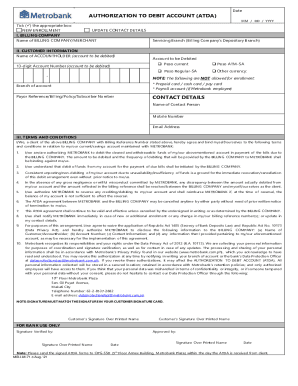
AUTHORIZATION TO DEBIT ACCOUNT (ADA)Date MM / DD / Joystick () the appropriate box: NEW ENROLLMENT UPDATE CONTACT DETAILS I. BILLING COMPANY Name of BILLING COMPANY/MERCHANT II. CUSTOMER INFORMATION.

How it works
  • Open form

    Open form follow the instructions

  • Easily sign form

    Easily sign the form with your finger

  • Share form

    Send filled & signed form or save

How to fill out the PH Metrobank MB-I-M-71-t online

Filling out the PH Metrobank MB-I-M-71-t form is an essential step for enrolling in a debit arrangement for payment of bills. This guide will walk you through each section of the form, ensuring that you complete it accurately and efficiently.

Follow the steps to successfully complete the PH Metrobank MB-I-M-71-t online

  1. Click the ‘Get Form’ button to obtain the form and open it in your editor.
  2. Begin by entering the date in the format MM/DD/YYYY at the top of the form.
  3. Tick the appropriate box to indicate whether this is a new enrollment or an update to your contact details.
  4. In section I, provide the name of the billing company or merchant that you will be enrolling for debit payments.
  5. In section II, enter the customer information including the name of the accountholder and the 13-digit account number that will be debited.
  6. Select the servicing branch of your billing company's depository branch.
  7. Indicate the specific account type to be debited by ticking the appropriate box for Peso current, Peso ATM-SA, Peso Regular-SA, or other currency.
  8. Fill in the payor reference/billing/policy/subscriber number as provided by the billing company.
  9. Next, fill in the contact details section which includes the name of the contact person, their mobile number, and email address.
  10. Review the terms and conditions carefully. You must agree to them by confirming you understand your responsibilities and the authorization granted to Metrobank.
  11. Finally, sign the document with your signature matching the signature in your customer signature card. Include your printed name underneath your signature.
  12. Once reviewed, submit the completed form. You can save changes, download, print, or share the form as needed.

Complete your documents online to streamline your banking experience.

Get form

Experience a faster way to fill out and sign forms on the web. Access the most extensive library of templates available.

Related content

SSA-1199 Forms - Social Security

Use the SSA-1199 sign-up form to enroll in International Direct Deposit (IDD). Forms are...

Learn more
(DOC) METROBANK CARD CORPORATION DISPUTE FORM ...

METROBANK CARD CORPORATION DISPUTE FORM Transaction Dispute Details: POSTING DATE...

Learn more
Questions & Answers

Get answers to your most pressing questions about US Legal Forms API.

Contact support

What documents do I need to open a bank account at Metrobank?

We've made it really easy to open a personal current account with Metro Bank. Just come in to one of our stores or apply online - all you'll need is proof of your identity and up to two documents for proof of address. Your current account will be up and running straight away.

Yes, you can open a bank account completely online, without ever going into a bank branch. With a completely online bank or account, you can also do all your account management online.

You can open a personal Current Account online, or just pop into one of our stores. You can also open selected personal savings accounts online.

Start using the NEW Metrobank App by signing up with your Metrobank deposit account or credit card. Access smart, simple, and secure online banking anytime anywhere through this simple login process.

Anyone can open a bank account in the Philippines. In the past, non-residents, including those holding a temporary visitor's visa, couldonly open a foreign currency deposit account, or a peso account funded by foreign currency deposits converted to peso.

On your web browser, type https://onlinebanking.metrobank.com.ph and click SIGN UP. 2. Fill up the required information. Remember to create a unique username and a strong password.

You can use your card everywhere that you see the MasterCard logo to pay for goods or withdraw cash. Your Metro Bank debit and credit cards are completely free of fees when used in the UK and Europe* and a charge will apply for using you card outside of Europe.

To download your statements in your internet banking: Click 'Account Statements' Select which years statements you want to see. Click 'View' for the month you would like to see. You can now see and download your statement.

Get This Form Now!

Use professional pre-built templates to fill in and sign documents online faster. Get access to thousands of forms.

If you believe that this page should be taken down, please follow our DMCA take down process here.

Get PH Metrobank MB-I-M-71-t