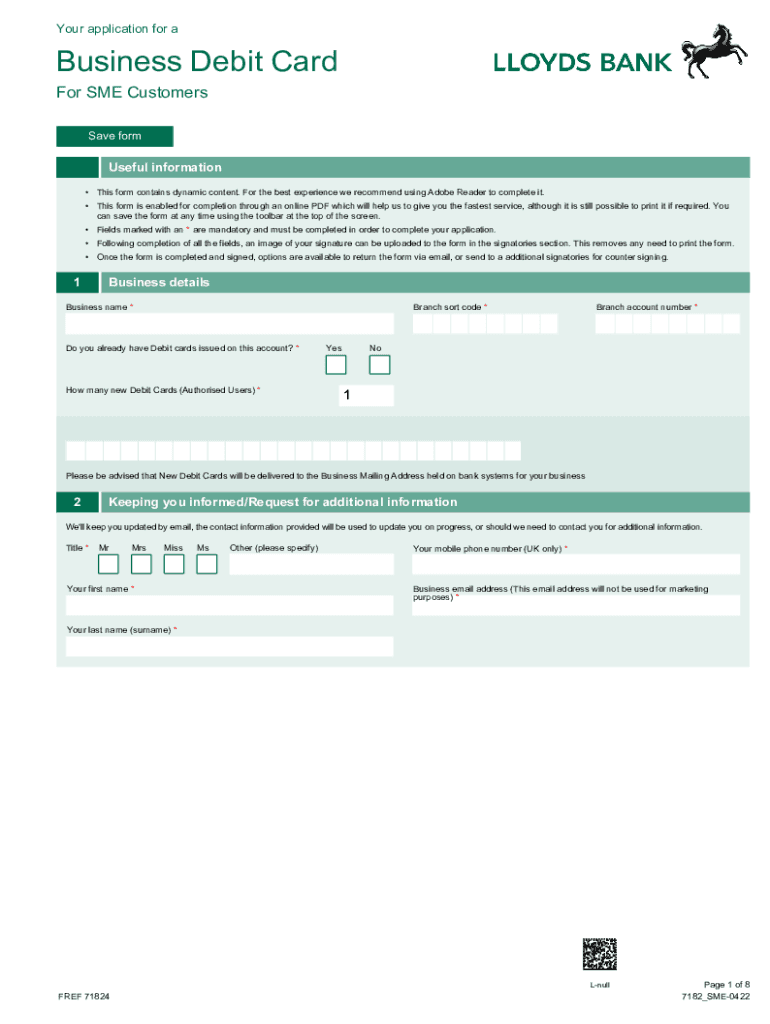
It. This form is enabled for completion through an online PDF which will help us to give you the fastest service, although it is still possible to print it if required. You can save the form at any time using the toolbar at the top of the screen. Fields marked with an * are mandatory and must be completed in order to complete your application. Following completion of all the fields, an image of your signature can be uploaded to the form in the signatories section. This removes any n.

Open form follow the instructions

Easily sign the form with your finger

Send filled & signed form or save
How to fill out the UK Lloyds Bank 7182 online
The UK Lloyds Bank 7182 form is essential for businesses seeking to apply for a Business Debit Card. This guide will provide you with step-by-step instructions to easily complete the form online, ensuring that all required information is accurately captured.
Follow the steps to successfully complete the UK Lloyds Bank 7182 form online.
- Click ‘Get Form’ button to obtain the form and open it in the editor.
- Begin by filling out the 'Business details' section, including your business name, branch sort code, and whether you already have debit cards issued on this account. Ensure mandatory fields marked with an * are completed.
- In the 'Keeping you informed/Request for additional information' section, provide your title, first and last name, mobile phone number, and business email address. This information helps the bank maintain communication about your application.
- Fill out the 'Details of New Debit Card Holders (Authorised Users)' section for each individual authorized to use the card, including their personal information such as date of birth and home address.
- Review the declaration and authorization section carefully. Confirm understanding of the terms and conditions regarding the issue and use of the Business Debit Card. Signing this confirms that you agree to the terms presented.
- Once all sections are completed, attach any required signatures. An image of your signature can also be uploaded directly within the form.
- After completing the form, you can use the available options to save changes, download, print, or email the form back to the bank for processing.
Complete your UK Lloyds Bank 7182 application online today for a seamless and efficient process.
Experience a faster way to fill out and sign forms on the web. Access the most extensive library of templates available.
Related content
To apply for a replacement card, you must provide one document to prove your identity....
Sep 15, 2020 — Use this form to pay fees for any form processed at a USCIS Lockbox....
You should use Form N-336, Request for a Hearing on a Decision in ... use the latest...
Use professional pre-built templates to fill in and sign documents online faster. Get access to thousands of forms.
If you believe that this page should be taken down, please follow our DMCA take down process here.