Loading
Get Dd 689 2017-2026
How it works
-

Open form follow the instructions
-

Easily sign the form with your finger
-

Send filled & signed form or save
How to fill out the DD 689 online
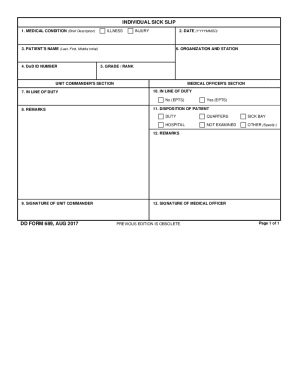
Filling out the DD 689, also known as the individual sick slip, is essential for documenting medical conditions among military personnel. This guide provides a straightforward process to complete the form online, ensuring that you accurately convey important health information.
Follow the steps to complete the DD 689 form.
- Click the ‘Get Form’ button to access the DD 689 and open it in the editor.
- In the first section, provide a brief description of the medical condition, indicating whether it is an illness or injury.
- Enter the date in the format YYYYMMDD to document when the sick slip is being filled out.
- Fill in the patient's name by entering their last name first, followed by their first name and middle initial.
- Input the Department of Defense (DoD) ID number for identification purposes.
- Complete the organization and station field to specify the military unit.
- Indicate the grade or rank of the patient to provide context for their medical status.
- In the unit commander's section, specify whether the condition is in line of duty.
- Fill out the medical officer's section by confirming if the condition is in line of duty and whether it was existing prior to service (EPTS).
- Provide additional remarks if needed to clarify any important details about the condition.
- Select the disposition of the patient, with options including duty, quarters, sick bay, hospital, not examined, or other, and specify if necessary.
- Add any final remarks relevant to the patient's condition.
- Sign the form in the unit commander's section followed by the medical officer's signature to verify the document.
- Once all sections are complete, you can save changes, download, print, or share the DD 689.
Complete your documents online today for a seamless experience.