Loading
Get Oh Forest Hills School District College Visit Form 2017-2026
How it works
-

Open form follow the instructions
-

Easily sign the form with your finger
-

Send filled & signed form or save
How to fill out the OH Forest Hills School District College Visit Form online
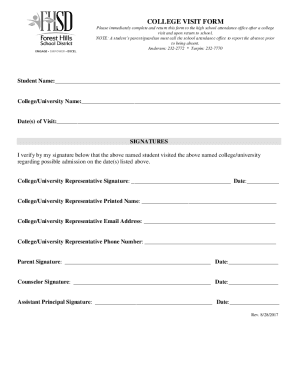
The OH Forest Hills School District College Visit Form is an essential document for students to report their college visits. This guide will provide you with clear, step-by-step instructions to help you complete the form online efficiently.
Follow the steps to fill out the College Visit Form online.
- Click ‘Get Form’ button to obtain the form and open it in your preferred editing interface.
- In the designated field, enter the full name of the student. Ensure the spelling matches the name as it appears on school records.
- Next, input the name of the college or university that was visited. This information is crucial for documentation purposes.
- Fill in the date(s) of the visit in the appropriate field. Make sure to list all applicable dates if multiple visits occurred.
- In the signatures section, the college or university representative must sign and date the form to verify the visit. They should also provide their printed name, email address, and phone number for follow-up.
- A parent or guardian must also sign and date the form to confirm their awareness of the visit and the absence from school.
- The form must then be signed and dated by the school counselor and the assistant principal as part of the verification process.
- After all sections are completed, ensure to save your changes. You can download, print, or share the form as needed.
Complete the OH Forest Hills School District College Visit Form online today to ensure all your college visit experiences are properly documented.
A campus visit is your opportunity to get a firsthand view of a college. A college catalog, brochure or website can only show you so much. To really get a feel for the college, you need to walk around the quad, sit in on a class and visit the dorms.