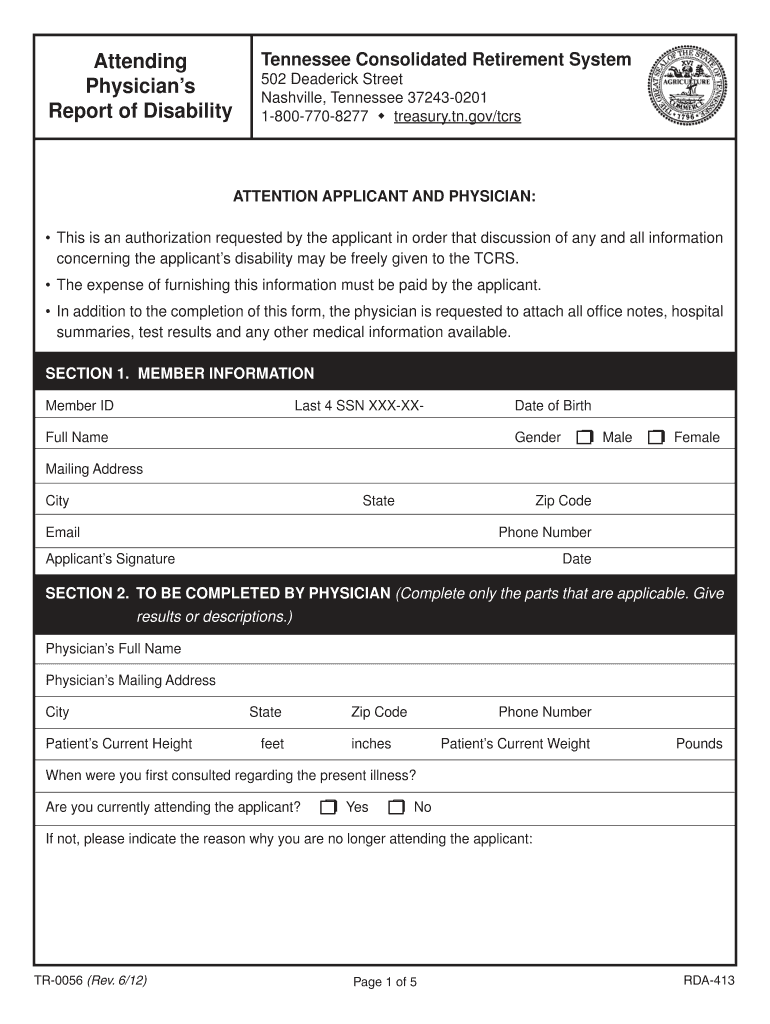
Attending Physicians Report of Disability Tennessee Consolidated Retirement System 502 Frederick Street Nashville, Tennessee 372430201 18007708277 treasury.tn.gov TCR ATTENTION APPLICANT AND PHYSICIAN:.
Loading

Open form follow the instructions

Easily sign the form with your finger

Send filled & signed form or save
How to fill out the TN TR-0056 online
The TN TR-0056 form, known as the attending physician’s report of disability, is a crucial document for applicants seeking benefits through the Tennessee Consolidated Retirement System. This guide provides clear, step-by-step instructions to help you complete this form online efficiently and correctly.
Follow the steps to fill out the TN TR-0056 form online with ease:
- Click ‘Get Form’ button to obtain the form and access it in the online editor.
- Begin by entering your member information, which includes your Member ID, last four digits of your Social Security number, full name, date of birth, gender, mailing address, city, state, email, zip code, and phone number.
- Next, you will need to provide your signature and the date next to the applicant's signature section.
- Proceed to Section 2, where your physician will need to input their full name and mailing address, including city, state, zip code, and phone number.
- Your physician must then record your current height (in feet and inches), current weight (in pounds), and specify when they first consulted regarding the present illness.
- The physician should indicate whether they are currently attending to you by selecting ‘Yes’ or ‘No’ and provide reasons if applicable.
- Following that, the physician must diagnose any primary or secondary impairments and describe relevant findings across various systems, like the musculoskeletal, respiratory, cardiovascular, mental health, and more. Each applicable section needs to be filled out with detailed notes or data.
- Finally, once all sections are completed, the physician should provide their signature and date, ensuring all additional medical documentation is attached before submission.
Complete your TN TR-0056 form online to ensure a smooth application process.
Experience a faster way to fill out and sign forms on the web. Access the most extensive library of templates available.
Related content
TR-0056 (Rev. ... Tennessee Consolidated Retirement System. 502 Deaderick Street...
A. General employees of the state of Tennessee classified as full-time, except full-time...
User manual instruction guide for M7300, 136-174MHz, 110W TR-0056-E HARRIS CORPORATION...
Get answers to your most pressing questions about US Legal Forms API.
How do I change my beneficiary on TCRS?
At the time of retirement from a TCRS covered employer, members will designate a final beneficiary on their retirement application. Log in to MyTCRS.com to change your TCRS beneficiaries. PLEASE NOTE: If you want to make a change of beneficiary after retirement, you will need to contact RetireReadyTN at 800-922-7772. Update Your Beneficiaries - Tennessee Department of Treasury tn.gov https://treasury.tn.gov › Information-and-Resources › Up... tn.gov https://treasury.tn.gov › Information-and-Resources › Up...
How do I request an estimate of benefits for TCRS?
To request an Estimate of Benefits for TCRS, simply call us at 800-922-7772. Forms and Guides - Tennessee Department of Treasury - TN.gov tn.gov https://treasury.tn.gov › Information-and-Resources › Fo... tn.gov https://treasury.tn.gov › Information-and-Resources › Fo...
How much do employers contribute to TCRS?
Employers are required to contribute 4% of a Hybrid Plan member's earnable compensation into TCRS. A member becomes vested in TCRS upon completing five years (60 months) of creditable service to a TCRS covered employer. Hybrid Retirement Plan for State Employees and Teachers tn.gov https://treasury.tn.gov › Retirement › HybridMemberGuide tn.gov https://treasury.tn.gov › Retirement › HybridMemberGuide
How to calculate Tennessee teacher retirement?
Lifetime monthly benefits payable to vested members at retirement. Benefits are determined by a set formula: Accrual Factor (1.5%) x AFC (average highest consecutive five year salaries) x Years of Service = Monthly Benefit with/without Benefit Improvement Percentage (BIP).
How long do you have to work for the state of TN to get a pension?
After a five-year vesting period, an employee becomes eligible to receive a monthly benefit at retirement once the age requirement is met. The benefit is calculated by the employee's years of service and salary. The benefit provided by TCRS is a solid foundation for building a retirement future.
Will state of TN retirees get a raise in 2024?
Retired teachers and state employees who have been on the TCRS retired payroll for at least 12 consecutive months as of July 1, 2024 will receive a 3% cost-of-living adjustment, the highest increase available under laws governing TCRS.
How do I check my TCRS retirement online?
After you register for a Retiree Self-Service account, you can use your user ID and password to log in to the Retiree Self-Service website 24 hours a day, 7 days a week to access your account information. Retiree Self-Service - TCRS tn.gov https://mytcrs.tn.gov › SelfServiceHelp.Retiree tn.gov https://mytcrs.tn.gov › SelfServiceHelp.Retiree
How do I contact the Tennessee Consolidated Retirement System?
You may contact the Tennessee Consolidated Retirement System at 502 Deaderick Street, 15th Floor, Andrew Jackson Building at (615) 741-7063 or the Board Administrator Jamie Wayman by email at jamie.wayman@tn.gov.
Use professional pre-built templates to fill in and sign documents online faster. Get access to thousands of forms.
If you believe that this page should be taken down, please follow our DMCA take down process here.