Loading
Get Pa Mv-70s 2021-2026
How it works
-

Open form follow the instructions
-

Easily sign the form with your finger
-

Send filled & signed form or save
How to fill out the PA MV-70S online
The PA MV-70S form is essential for registering trucks and other large vehicles in Pennsylvania. This guide provides clear and detailed steps for completing the form online, ensuring a smooth and efficient registration process for all users.
Follow the steps to successfully complete the PA MV-70S online.
- Click the ‘Get Form’ button to retrieve the PA MV-70S form and access it in your digital workspace.
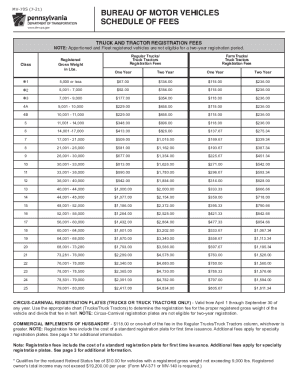
- Begin by entering the vehicle's information, including the registered gross weight, to determine the appropriate fee based on the weight class. Review the registration fee schedule provided to ensure accuracy.
- Next, fill in the owner’s details such as the name, address, and contact information. Ensure that all information provided is up-to-date to avoid processing delays.
- Indicate the type of registration for your vehicle, whether it is a regular truck, farm truck, or another classification as applicable. This is important as it may affect the fees owed.
- Select any optional services you may require, including specialty plates or additional registrations. Be mindful of any additional fees that may apply.
- After completing all sections of the form, review all entries for accuracy. It is essential to catch any errors before submitting to avoid delays.
- Finally, you will have options to save your changes, download the completed form, print it for your records, or share it with the necessary authorities.
Ensure your vehicle registration is submitted promptly by completing the PA MV-70S form online today.