Loading
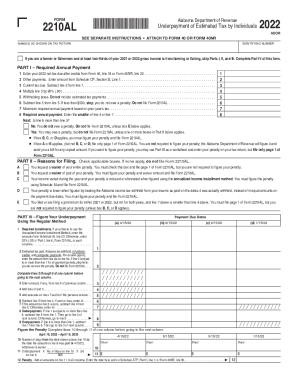
Get Al Dor 2210al 2022-2026
How it works
-

Open form follow the instructions
-

Easily sign the form with your finger
-

Send filled & signed form or save
How to fill out the AL DoR 2210AL online
The AL DoR 2210AL is an essential form for individuals in Alabama to report underpayment of estimated tax. This guide provides clear, step-by-step instructions on how to complete the form effectively and accurately online.
Follow the steps to complete the AL DoR 2210AL online.
- Press the ‘Get Form’ button to access the form and open it in your chosen online tool.
- Begin with Part I, where you will need to enter your 2022 net tax due after credits from Form 40, line 18 or Form 40NR, line 20 in the appropriate field.
- Input any other payments as instructed, including amounts from Schedule CP, Section B, Line 1.
- Calculate your current tax due by subtracting the amount on line 2 from line 1.
- Multiply the current tax due by 90% and enter the result on the designated line.
- Document any withholding taxes not related to estimated tax payments on the specified line.
- If less than $500 after the previous calculations, you do not owe a penalty and are not required to file Form 2210AL.
- Determine the maximum required annual payment based on the previous year's tax and enter that amount.
- Enter the smaller amount of line 4 or line 7 as your required annual payment.
- Proceed to Part II and check applicable boxes to provide reasons for filing. If none apply, you do not need to file the form.
- For Part III, calculate your underpayment using the regular method or the annualized income installment method by following the specified calculations.
- Complete the necessary calculations for figuring out underpayment in sections 1 through 12.
- Once all calculations are complete, review the entire form for accuracy.
- Finally, save your changes, download the completed form, print it, or share it as necessary.
Complete your tax documents online today to ensure compliance and avoid penalties.