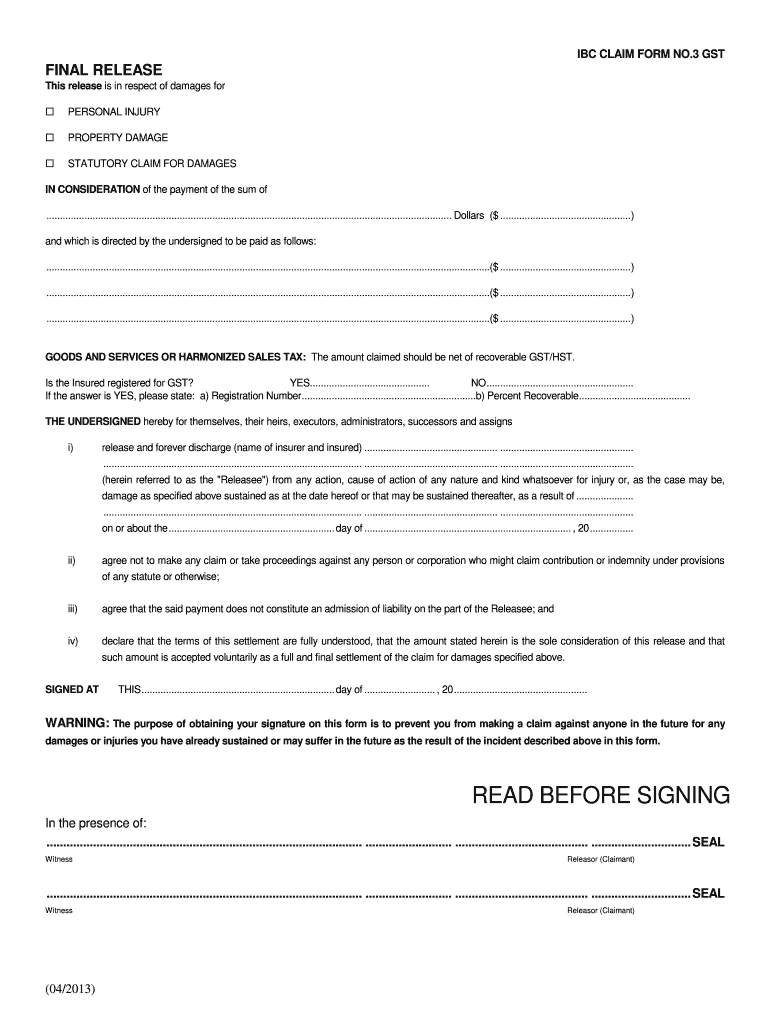
Dollars ($ ................................................) and which is directed by the undersigned to be paid as follows: ...................................................................................................................................................................($ ................................................) .
Loading

Open form follow the instructions

Easily sign the form with your finger

Send filled & signed form or save
How to fill out the Canada IBC Claim Form No. 3 GST online
Filling out the Canada IBC Claim Form No. 3 GST online can be straightforward when you have the right guidance. This form is essential for claiming damages related to personal injuries, property damage, or statutory claims, ensuring that your claims process is properly documented.
Follow the steps to complete your form efficiently.
- Click ‘Get Form’ button to obtain the form and open it in the editor.
- Begin by selecting the type of claim from the options provided: personal injury, property damage, or statutory claim for damages.
- Indicate the total amount you are claiming in the space provided, ensuring that the figure reflects the net of any recoverable GST/HST.
- If you are registered for GST, mark 'Yes' and fill in your registration number and the percentage recoverable. If not, select 'No.'
- Complete the section detailing the Releasee. You will need to provide the names of the insurer and the insured involved in the claim.
- Review and confirm the terms of the release, including your agreement not to file further claims once signed.
- Sign and date the form in the designated area, ensuring that it is completed in the presence of a witness for validity.
- After completing the form, you can save any changes, then download, print, or share the document as necessary.
Take the next step and fill out your Canada IBC Claim Form No. 3 GST online today.
Experience a faster way to fill out and sign forms on the web. Access the most extensive library of templates available.
Related content
A Borrower shall request each Revolving Credit Advance by written notice to Lender...
Jul 20, 2020 — Starting from registration to filing returns and payment of GST tax it's...
by O ANNU · Cited by 1 — This financial report covers the consolidated entity...
Get answers to your most pressing questions about US Legal Forms API.
How to file a business insurance claim?
Filing a business insurance claim involves several key steps. Start by notifying your insurance company, and then collect all relevant documentation, including the Canada IBC Claim Form No. 3 GST, to substantiate your claim. Submit your evidence promptly and maintain open communication with your insurer for updates. Tools from uslegalforms can enhance your understanding of the requirements and steps, making your claim process smoother.
What is the agreement of guiding principles?
The agreement of guiding principles pertains to the foundational standards that govern the relationships between insurers and policyholders. It emphasizes fairness, transparency, and prompt communication regarding claims processes. Utilizing documents like the Canada IBC Claim Form No. 3 GST aligns your claim with these principles, ensuring a structured approach to resolving issues. A clear understanding helps you leverage your rights when filing a claim.
How do I file an insurance claim for my business?
To file an insurance claim for your business, begin by contacting your insurance provider to report the incident. Gather all necessary evidence, such as photos and receipts, and complete the Canada IBC Claim Form No. 3 GST. Submit all documentation promptly to ensure a swift review and resolution. Platforms like uslegalforms can assist you in understanding the necessary steps to take and help ensure your documents are in order.
Is it better to file a claim with your insurance or theirs?
Deciding whether to file a claim with your insurance or the other party's can depend on various factors, including the incident's specifics. Typically, filing with your insurance may expedite the claim process, as they can guide you through using the Canada IBC Claim Form No. 3 GST. However, it is crucial to analyze any potential impacts on your premiums when choosing the best path forward. Consulting with a claims expert can provide clarity on the appropriate approach.
How do business insurance claims work?
Business insurance claims work by notifying your insurance provider about a loss or damage incident. After submitting the claim, your insurer assesses the situation, reviews the evidence, and determines the payout. It's essential to provide the necessary documentation, such as invoices and the Canada IBC Claim Form No. 3 GST, to streamline this process. Utilizing platforms like uslegalforms can assist you in navigating these claims effectively.
Are car insurance claims taxable in Canada?
In Canada, car insurance claims are generally not taxable. The reason is that compensation from insurance claims merely reimburses you for losses you incurred, rather than providing a profit. However, if you receive a settlement for lost income or are compensated for something leading to a profit, that portion could be subject to taxes. For more detailed information on claims processes, including forms like the Canada IBC Claim Form No. 3 GST, consult a tax professional.
What is the guiding principle of accountability?
The guiding principle of accountability emphasizes the importance of taking responsibility for actions and decisions. In an insurance context, this means that companies and policyholders both have obligations toward each other. Understanding accountability can lead to a more effective process when completing the Canada IBC Claim Form No. 3 GST, ensuring that all parts are accurate and justified.
Where can I get a proof of loss form?
You can obtain a proof of loss form from various sources, including your insurance company or online platforms. Many insurance providers offer downloadable forms on their websites. For an efficient way to get all necessary documents, including the Canada IBC Claim Form No. 3 GST, UsLegalForms provides a comprehensive resource for insurance claims.
What is the guiding principle?
The guiding principle is an overarching rule or belief that directs behaviors and decisions within a given context. In insurance, guiding principles focus on fairness, transparency, and helping clients navigate the claims process. By being aware of these principles, you can facilitate a smoother experience when submitting the Canada IBC Claim Form No. 3 GST.
What is a set of guiding principles?
A set of guiding principles serves as a framework for decision-making and behavior within an organization or system. These principles ensure that actions align with specific values and societal expectations. In the context of insurance claims, such principles can guide you on how to effectively complete the Canada IBC Claim Form No. 3 GST.
Use professional pre-built templates to fill in and sign documents online faster. Get access to thousands of forms.
If you believe that this page should be taken down, please follow our DMCA take down process here.