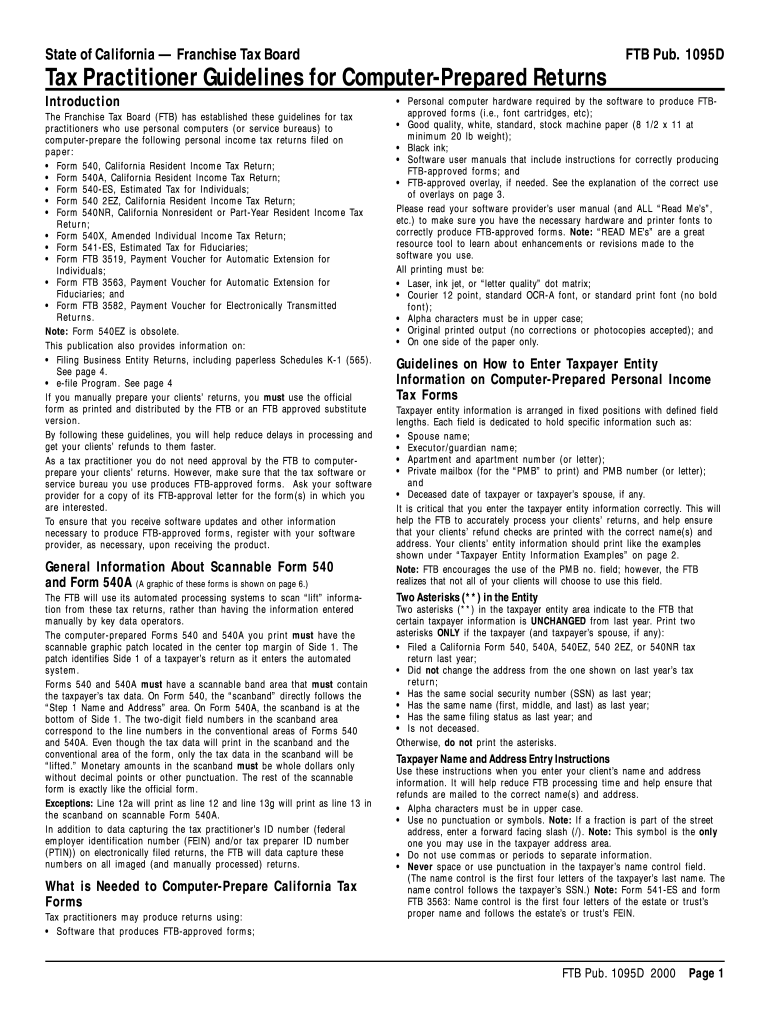
For tax practitioners who use personal computers (or service bureaus) to computer-prepare the following personal income tax returns filed on paper: Form 540, California Resident Income Tax Return; Form 540A, California Resident Income Tax Return; Form 540-ES, Estimated Tax for Individuals; Form 540 2EZ, California Resident Income Tax Return; Form 540NR, California Nonresident or Part-Year Resident Income Tax Return; Form 540X, Amended Individual Income Tax Return; For.
Loading

Open form follow the instructions

Easily sign the form with your finger

Send filled & signed form or save
How to fill out the CA FTB 1095D online
The CA FTB 1095D form is essential for taxpayers in California to report crucial tax information. This guide aims to provide clear and supportive instructions on how to complete the form online, ensuring a smooth filing process.
Follow the steps to fill out the CA FTB 1095D accurately.
- Click the ‘Get Form’ button to obtain the CA FTB 1095D form and open it in your preferred editor for editing.
- Begin by entering the taxpayer's information, including the name, address, and Social Security Number (SSN) in the designated fields. Ensure that names are in upper case without punctuation except for a forward slash if needed.
- Fill in any relevant income details as per the guidelines provided, ensuring accuracy to avoid processing delays.
- Complete the direct deposit information if applicable, by entering the routing number, account number, and account type, making sure all fields are filled.
- Review each section thoroughly to ensure all information is correctly entered according to the guidelines outlined in the publication.
- Once all fields are filled, save your changes, and you may download, print, or share the completed form as necessary.
Start completing your CA FTB 1095D form online today for a hassle-free filing experience!
Experience a faster way to fill out and sign forms on the web. Access the most extensive library of templates available.
Related content
Form FTB 3563, Payment for Automatic Extension for. Fiduciaries, is used only if an estate...
For more information, go to ftb.ca.gov and search for business e file. ... information...
SG73/D MOTOROL.A MOTOROLA SEMICONDUCTOR MASTER SELECTION GUIDE REV 10 Introduction...
Get answers to your most pressing questions about US Legal Forms API.
Why is the Franchise Tax Board charging me?
Filing enforcement fee: Individuals and businesses We charge a filing enforcement cost recovery fee for any individual or business who fails to file a required tax return in response to a legal demand to file.
How do I avoid franchise tax in California?
Sole proprietors and general partnerships don't register with the Secretary of State and so are free from paying the California Franchise Tax.
What is the FTB CA refund?
The Middle Class Tax Refund (MCTR) is a one-time payment to provide relief to Californians. If you are eligible, you will automatically receive a payment. Payments are expected to be issued between October 2022 and January 2023. For questions or to activate your card, visit the Contact information on this page.
What triggers CA FTB audit?
Any activity that raises a red flag with the FTB can trigger a residency audit. It can be something as simple as living in another state and having a second home in California, to a tip-off from the IRS or another third party.
Do I have to pay the California Franchise Tax Board?
Every corporation that is incorporated, registered, or doing business in California must pay the $800 minimum franchise tax.
Why do I owe California Franchise Tax Board?
Filing a late tax return is one of the most common reasons that a large number of taxpayers owe money to the FTB. Specifically, a taxpayer can incur late fees on an unfiled return the day after not filing their tax return.
Is California Franchise Tax Board same as IRS?
The FTB functions on the state level similarly to the IRS. California taxpayers may face collection actions by the FTB if the taxpayer is unable or unwilling to pay an outstanding state tax balance.
Why would I get a letter from the California Franchise Tax Board?
The Franchise Tax Board will send a notice or letter for issues that may include but not limited to: You have a balance due. You are due a larger or smaller refund. We need to notify you of delays in processing your return.
Use professional pre-built templates to fill in and sign documents online faster. Get access to thousands of forms.
If you believe that this page should be taken down, please follow our DMCA take down process here.