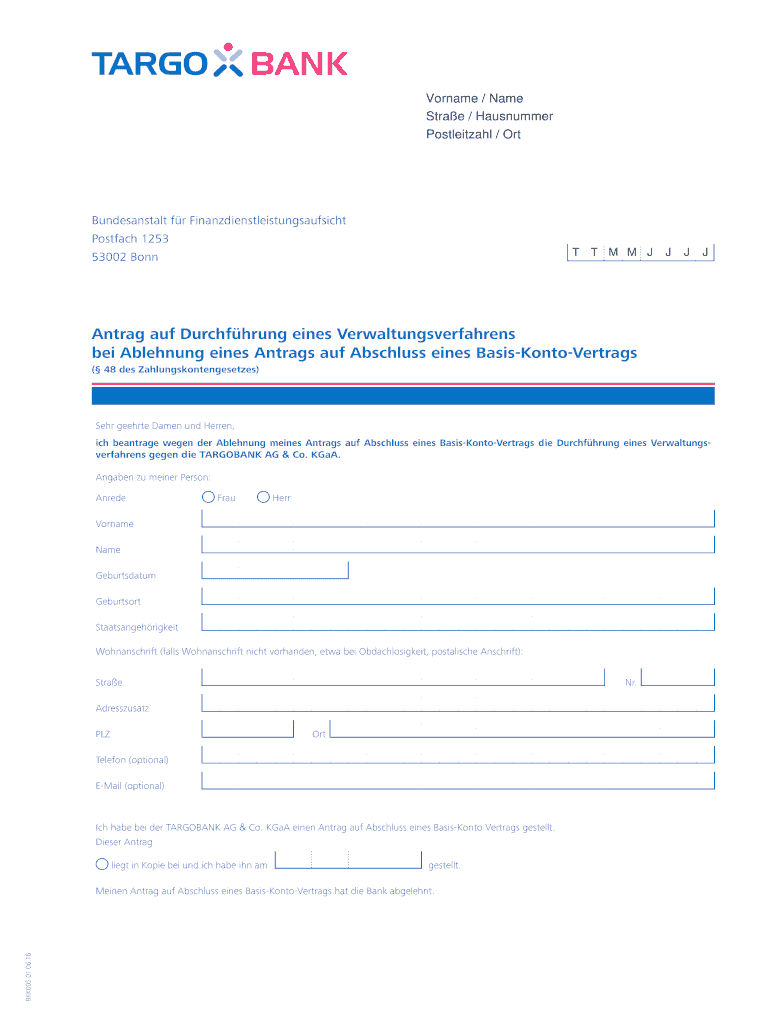
Ant rag AUF Dutch hung lines Verwaltungsverfahrens BEI Ablehnung lines Ant rags AUF Schloss lines Basis-Konto-Vertrags (48 DES Zahlungskontengesetzes).
Loading

Open form follow the instructions

Easily sign the form with your finger

Send filled & signed form or save
How to fill out the DE Targo Bank BKK005 online
Filling out the DE Targo Bank BKK005 form online can seem daunting, but this guide will help you understand each section and ensure accurate completion. Whether you are requesting a review of a rejected basic account application or need guidance on how to provide the necessary information, this comprehensive guide will support you through the process.
Follow the steps to complete the form accurately.
- Click ‘Get Form’ button to obtain the form and open it in the editor.
- Begin by entering your personal information at the top of the form, including your first name, last name, street address, house number, postal code, and city of residence.
- You will see a section titled 'Federal Financial Supervisory Authority’ with the address. This information is provided for reference and does not require any input from you.
- Indicate the relevant dates using the designated fields for the application date and the notification date of the rejection. Clearly write the month, day, and year as appropriate.
- In the section requesting details about your personal circumstances, select your salutation (e.g., Mr., Ms.) and fill in your date of birth, place of birth, nationality, and your current home address. If you do not have a permanent address, you may use a postal address.
- Provide your optional contact information, including telephone number and email address, to facilitate communication.
- Include the details of your initial application for a basic account. Attach a copy of the application if required and specify the date it was submitted.
- Describe the rejection of your application by referencing the attached refusal letter. In this section, you may also include the bank’s reasons for denying your application, if provided.
- Add any explanation or justification for your appeal concerning the bank's refusal. If no additional information is available, continue to the next step.
- Finally, fill in the location and date fields before signing. Ensure you write your name clearly in block letters in the designated area.
- Review your completed form to ensure all fields are accurately filled in and make any necessary adjustments before proceeding to save, download, print, or share your form.
Complete your DE Targo Bank BKK005 form online today for prompt processing of your request.
Experience a faster way to fill out and sign forms on the web. Access the most extensive library of templates available.
Use professional pre-built templates to fill in and sign documents online faster. Get access to thousands of forms.
If you believe that this page should be taken down, please follow our DMCA take down process here.
This form is available in several versions. Select the version you need from the drop-down list below.