Loading
Get India Spark Form 3 2020-2026
How it works
-

Open form follow the instructions
-

Easily sign the form with your finger
-

Send filled & signed form or save
How to fill out the India SPARK Form 3 online
This guide provides a clear and detailed overview of how to fill out the India SPARK Form 3 online. Whether you are familiar with digital forms or new to the process, you will find step-by-step instructions to help you complete the form with ease.
Follow the steps to successfully complete the form online.
- Click 'Get Form' button to obtain the form and open it in the editor.
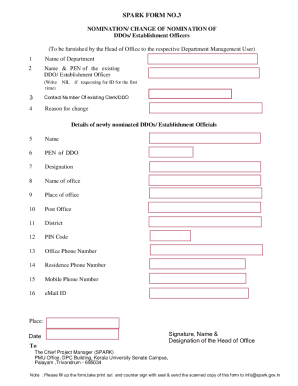
- Begin by entering the name of the department in the first field. This is essential to identify which department the nomination pertains to.
- In the second field, provide the name and PEN of the existing DDO or Establishment Officer. If you are requesting an ID for the first time, simply write 'NIL'.
- Next, fill in the contact number of the existing Clerk or DDO. This information is important for communication purposes.
- Indicate the reason for the change in the designated field. This helps to clarify the context of the nomination.
- For the details of the newly nominated DDOs or Establishment Officials, complete the fields for name, PEN, designation, name of office, place of office, post office, district, PIN code, office phone number, residence phone number, mobile phone number, and e-mail ID. Accuracy in these details is crucial for proper processing.
- Once all fields have been filled out correctly, navigate to the bottom of the form. Here you will need to add the place and date.
- Finally, ensure the signature, name, and designation of the Head of Office are included. This step legitimizes the submission.
- Save the changes made to the form. Additionally, you may download, print, or share the completed form as required.
Begin filling out your India SPARK Form 3 online today for a smooth submission process.