Loading
Get Arch Foundation
How it works
-

Open form follow the instructions
-

Easily sign the form with your finger
-

Send filled & signed form or save
How to fill out the Arch Foundation online
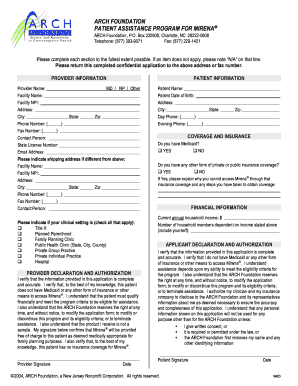
This guide provides a clear and supportive approach to filling out the Arch Foundation application for the patient assistance program for ®. By following these instructions, users will ensure that they complete the form accurately and efficiently.
Follow the steps to successfully complete your application.
- Press the ‘Get Form’ button to access the application form, enabling you to begin filling it out in the appropriate format.
- In the provider information section, enter the provider's name, designation (MD/NP/Other), facility name, NPI, and contact details. If the shipping address differs from the above, provide the separate facility name, NPI, and address.
- Moving on to the patient information section, fill in the patient's name, date of birth, address, and contact numbers for both daytime and evening.
- Indicate the type of clinical setting where the patient is receiving care by checking all relevant options provided, such as Title X, Planned Parenthood, or other categories.
- In the provider declaration and authorization section, the provider must verify that the information is complete and accurate. The provider's signature and date are required to confirm eligibility for assistance.
- In the coverage and insurance section, answer whether the patient has Medicaid or other insurance coverage. If applicable, explain the reasons for the inability to access ® through that coverage.
- Provide financial information by stating the current annual household income and the number of household members dependent on that income.
- Lastly, complete the applicant declaration and authorization section, where the patient must verify the information as accurate. The patient's signature and date are also required to finalize the application.
- Once you have filled out all necessary sections, review the completed form for accuracy. Save your changes, and you may choose to download, print, or share the form as needed.
Complete your application for assistance online today.
To remove files on Arch, you can use the 'rm' command followed by the file name. For directories, utilize 'rm -r' to delete them recursively. It's vital to double-check the files you intend to remove, as this action cannot be undone. The Arch Foundation provides resources to help users understand the command-line interface, which can enhance your efficiency in managing files.