Loading
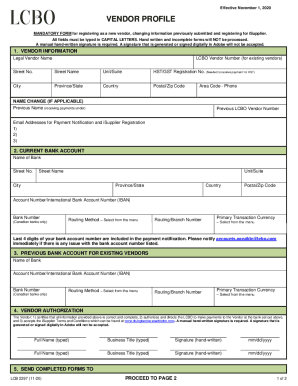
Get Lcbo Lcb 2297 2020-2026
How it works
-

Open form follow the instructions
-

Easily sign the form with your finger
-

Send filled & signed form or save
How to fill out the LCBO LCB 2297 online
Filling out the LCBO LCB 2297 form correctly is essential for registering as a new vendor or updating your vendor information. This guide will provide you with clear, step-by-step instructions to ensure a smooth online submission process.
Follow the steps to complete the LCBO LCB 2297 form effectively.
- Click the ‘Get Form’ button to obtain the form and open it in the editor.
- In the 'Vendor Information' section, enter the legal vendor name, the LCBO vendor number for existing vendors (if applicable), and the complete address including street number, street name, unit/suite, city, province/state, country, and postal/zip code. Ensure all fields are typed in capital letters.
- Provide the HST/GST registration number if you want to receive payments for HST, and include your area code and phone number in the designated fields.
- If there is a name change, fill out the previous name and LCBO vendor number fields. Enter the email addresses for payment notifications and iSupplier registration in the provided spaces.
- Move to the 'Current Bank Account' section. Enter the bank name and complete address with street number, street name, unit/suite, city, province/state, country, and postal/zip code. Provide your account number or International Bank Account Number (IBAN) as well as the bank number for Canadian banks.
- Select the routing method and enter the routing/branch number. Choose the primary transaction currency from the available menu.
- If you are an existing vendor and need to provide a previous bank account, complete that section with the required bank name, account number, bank number, routing method, and primary transaction currency.
- In the 'Vendor Authorization' section, certify that all information is correct and authorize payments. Type the full name and business title, and include a manual hand-written signature along with the date in mm/dd/yyyy format.
- Repeat the process for a second signature if necessary, providing all required information.
- Once all sections are complete, review the form for accuracy. Save changes, and prepare to download, print, or share the completed form as needed.
Ensure your vendor profile is up-to-date and submit the LCBO LCB 2297 form online smoothly.