Loading
Form preview
  • US Legal Forms
  • Form Library
  • Foreign Forms
  • Foreign UK Tax Forms
  • Uk Sa 109 2013

Get Uk Sa 109 2013

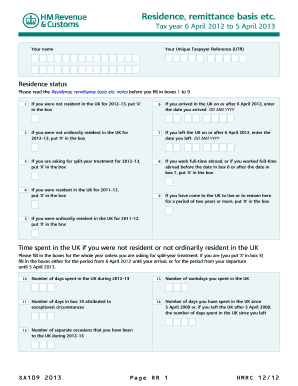
Es 1 to 9. 1 If you were not resident in the UK for 2012–13, put ‘X’ in the box 6  you arrived in the UK on or after 6 April 2012, enter If the date you arrived DD MM YYYY 2  you were not ordinarily resident in the UK for If 2012–13, put ‘X’ in the box 7  you left the UK on or after 6 April 2012, enter the If date you left DD MM YYYY 3  you are asking for split-year treatment for 2012–13, If put ‘X’ in the box 8  you work full-time abroad, or if you .

How it works

  1. Open form

    Open form follow the instructions

  2. Easily sign form

    Easily sign the form with your finger

  3. Share form

    Send filled & signed form or save

How to fill out the UK SA 109 online

The UK SA 109 form is essential for individuals who need to report their residence status, especially those with ties to multiple countries. This guide provides clear, step-by-step instructions to help you fill out the form accurately and confidently, ensuring compliance with tax regulations.

Follow the steps to complete the UK SA 109 form online.

  1. Press the ‘Get Form’ button to access and open the UK SA 109 form in your browser or editor.
  2. Begin with your personal details by entering your name and Unique Taxpayer Reference (UTR) in the designated fields.
  3. Review your residence status by filling in boxes 1 to 9: If you were not resident in the UK during the tax year 2012–13, mark box 1 with ‘X’. If you arrived in the UK after 6 April 2012, note the date in box 6.
  4. Continue with your residence details: Fill in boxes 2 and 3 as applicable, marking if you were not ordinarily resident or if you are requesting split-year treatment.
  5. In section 10 onwards, provide the number of days you spent in the UK, workdays, and any exceptional circumstances affecting your residence status.
  6. For personal allowances, indicate in boxes 15 and 16 if you qualify as a non-resident or dual resident for allowances due to Double Taxation Agreements.
  7. Specify your residence in other countries by entering relevant country codes in boxes 18 and 19, and any relief amounts in boxes 20 and 21.
  8. Under domicile, fill out boxes 22 to 26 to indicate your domicile status, ensuring you accurately document any changes.
  9. For the remittance basis, complete boxes 27 to 37 regarding your claims and investments, including any adjustments related to previous claims.
  10. In box 38, provide any additional information that relates to your residency, allowances, or claims that are not captured elsewhere in the form.
  11. Once all sections are completed, save your changes, then download, print, or share the form as needed for submission.

Start completing your UK SA 109 form online today for an efficient filing experience.

Get form

Experience a faster way to fill out and sign forms on the web. Access the most extensive library of templates available.

Related content

High-dose Rifampicin, , and SQ109 for ...
by MJ Boeree · 2017 · Cited by 443 — A dose of 35 mg/kg rifampicin was safe, reduced...
Learn more
EUR-Lex: EU law
Access the authentic Official Journal of the European Union, EU law, EU case-law...
Learn more
Parkinson
by E Dias-Tosta — CARLOS ROBERTO DE MELLO RIEDER. Membro Titular da Academia Brasileira...
Learn more

Related links form

OH SOS 31-N OH SOS 580 2019 FL Wastewater Capacity Application - Orange County 2013 SC Form 531GC - Greenville County 2019

Questions & Answers

Get answers to your most pressing questions about US Legal Forms API.

Contact support

To inform HMRC that you are no longer working, you should contact them directly and provide your updated employment status. Completing the SA109 form can also help clarify your tax obligations if your work situation has changed alongside your residency. Documentation supporting your status may be required for processing. Maintaining clear communication with HMRC helps prevent future tax liabilities.

The SA109 form must be completed by individuals who are non-UK residents and wish to claim relief from UK tax on foreign income. This includes people who leave the UK and want to clarify their residency status. If you have previously claimed non-domiciled status, you should also fill out this form. It’s a vital step in ensuring your tax obligations are correctly handled.

There has been ongoing discussion about the status of non-domicile tax rules in the UK, but as of now, it has not been abolished. Some changes have been proposed, especially regarding tax benefits for long-term residents. Staying updated on legislative changes is crucial for non-doms in the UK. Keep an eye on updates from HMRC and seek professional advice to navigate these changes.

As a non-domiciled resident, you can stay in the UK indefinitely, provided you do not categorize yourself as a UK domicile. However, you may be subject to specific tax rules, particularly related to income and gains earned outside the UK. It's essential to understand these regulations to avoid unexpected tax liabilities. Utilize resources like the UK SA 109 form for clarity on your tax status.

If you are leaving the UK, start by notifying HMRC and completing the SA109 form. Also, consider closing UK bank accounts and updating your address with relevant institutions. Make sure to settle any outstanding tax obligations before your departure. This proactive approach helps avoid complications later.

When you leave the UK, you should notify HM Revenue and Customs (HMRC) to ensure they update your tax records. Additionally, inform your bank and any financial institutions about your change of residency. If you have a healthcare provider, let them know as well. Remember, maintaining clear communication is vital for a smooth transition.

Submitting a SA109 form is straightforward. You can include it when filing your Self Assessment tax return online or via paper. Ensure all sections are completed accurately, as this form is crucial for reporting foreign income and taxes. If you're unsure, platforms like US Legal Forms offer templates and guidance to help you complete and submit your UK SA 109 form effectively.

To claim the remittance basis in the UK, you must be a non-domiciled resident who only pays tax on UK income and income remitted to the UK. You need to indicate your choice on your tax return and complete the UK SA 109 form to report your foreign income properly. Be mindful of the eligibility conditions and consider seeking professional advice if needed. This approach can lead to significant tax savings for qualifying individuals.

Yes, the UK has a tax treaty with the USA designed to avoid double taxation and prevent tax evasion. This treaty allows taxpayers to receive certain benefits, such as reduced withholding tax rates on dividends and interest. Understanding the terms is crucial for expatriates or cross-border investors. Utilizing the UK SA 109 form can help you navigate the benefits of the treaty more efficiently.

Informing HMRC about your departure from the UK is crucial for tax compliance. You can do this by completing the relevant sections on the UK SA 109 form when you fill out your tax return. Ensure you provide your departure details accurately to avoid any issues with HMRC. Prompt notification helps clarify your tax obligations and can ease the process of claiming any potential refunds.

Get This Form Now!

Use professional pre-built templates to fill in and sign documents online faster. Get access to thousands of forms.
If you believe that this page should be taken down, please follow our DMCA take down processhere.

Industry-leading security and compliance

US Legal Forms protects your data by complying with industry-specific security standards.
  • In businnes since 1997
    25+ years providing professional legal documents.
  • Accredited business
    Guarantees that a business meets BBB accreditation standards in the US and Canada.
  • Secured by Braintree
    Validated Level 1 PCI DSS compliant payment gateway that accepts most major credit and debit card brands from across the globe.
Get UK SA 109
  • Adoption
  • Bankruptcy
  • Contractors
  • Divorce
  • Home Sales
  • Employment
  • Identity Theft
  • Incorporation
  • Landlord Tenant
  • Living Trust
  • Name Change
  • Personal Planning
  • Small Business
  • Wills & Estates
  • Packages A-Z
  • Affidavits
  • Bankruptcy
  • Bill of Sale
  • Corporate - LLC
  • Divorce
  • Employment
  • Identity Theft
  • Internet Technology
  • Landlord Tenant
  • Living Wills
  • Name Change
  • Power of Attorney
  • Real Estate
  • Small Estates
  • Wills
  • All Forms
  • Forms A-Z
  • Form Library
  • Legal Hub
  • About Us
  • Help Portal
  • Legal Resources
  • Blog
  • Affiliates
  • Contact Us
  • Delete My Account
  • Site Map
  • Industries
  • Forms in Spanish
  • Localized Forms
  • State-specific Forms
  • Forms Kit
  • Real Estate Handbook
  • All Guides
  • Notarize
  • Incorporation services
  • For Consumers
  • For Small Business
  • For Attorneys
  • USLegal
  • FormsPass
  • pdfFiller
  • signNow
  • altaFlow
  • DocHub
  • Instapage
Form Packages
  • Adoption
  • Bankruptcy
  • Contractors
  • Divorce
  • Home Sales
  • Employment
  • Identity Theft
  • Incorporation
  • Landlord Tenant
  • Living Trust
  • Name Change
  • Personal Planning
  • Small Business
  • Wills & Estates
  • Packages A-Z
Form Categories
  • Affidavits
  • Bankruptcy
  • Bill of Sale
  • Corporate - LLC
  • Divorce
  • Employment
  • Identity Theft
  • Internet Technology
  • Landlord Tenant
  • Living Wills
  • Name Change
  • Power of Attorney
  • Real Estate
  • Small Estates
  • Wills
  • All Forms
  • Forms A-Z
  • Form Library
Customer Service
  • Legal Hub
  • About Us
  • Help Portal
  • Legal Resources
  • Blog
  • Affiliates
  • Contact Us
  • Delete My Account
  • Site Map
  • Industries
  • Forms in Spanish
  • Localized Forms
  • State-specific Forms
  • Forms Kit
Legal Guides
  • Real Estate Handbook
  • All Guides
Prepared for you
  • Notarize
  • Incorporation services
Our Customers
  • For Consumers
  • For Small Business
  • For Attorneys
Our Sites
  • USLegal
  • FormsPass
  • pdfFiller
  • signNow
  • altaFlow
  • DocHub
  • Instapage
Social Media
Call us now toll free:
+1 833 426 79 33
As seen in:
© Copyright 1999-2026 airSlate Legal Forms, Inc. 3720 Flowood Dr, Flowood, Mississippi 39232
  • Your Privacy Choices
  • Terms of Service
  • Privacy Notice
  • Content Takedown Policy
  • Bug Bounty Program
UK SA 109
This form is available in several versions.
Select the version you need from the drop-down list below.
2020 UK SA 109
Select form
  • 2020 UK SA 109
  • 2019 UK HMRC SA109
  • 2018 UK HMRC SA109
  • 2017 UK HMRC SA109
  • 2013 UK SA 109
Select form