Loading
Get Nd Self-certification Affidavit 2022-2026
How it works
-

Open form follow the instructions
-

Easily sign the form with your finger
-

Send filled & signed form or save
How to fill out the ND Self-Certification Affidavit online
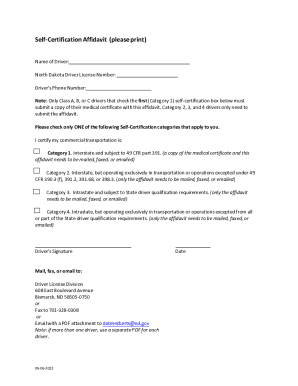
The ND Self-Certification Affidavit is an essential document for drivers to certify their commercial transportation qualifications. This guide provides a clear and supportive step-by-step approach to filling out the form online, ensuring that all users can navigate the process with ease.
Follow the steps to complete the ND Self-Certification Affidavit online
- Click the ‘Get Form’ button to access the ND Self-Certification Affidavit and open it in the appropriate editor.
- Begin by entering your name in the 'Name of Driver' field, ensuring that it matches your identification documents.
- Next, input your North Dakota Driver License Number in the designated field, as this information is crucial for identification purposes.
- Provide your phone number in the 'Driver’s Phone Number' field, allowing for easy contact if necessary.
- Review the self-certification categories and select only one that applies to your commercial transportation. Make sure to read the descriptions carefully to choose the correct category.
- If you selected Category 1, prepare a copy of your medical certificate, as it needs to be submitted along with the affidavit. For Categories 2, 3, and 4, only the affidavit is required.
- Sign the document in the 'Driver’s Signature' section to confirm that all provided information is accurate and truthful.
- Finally, save your changes, and decide whether to download, print, or share the completed affidavit as necessary. Remember that if you are completing this for more than one driver, a separate PDF must be used for each individual.
Complete your ND Self-Certification Affidavit online now to ensure compliance and streamline your commercial transportation process.
To Submit Your Reinstatement Fee Online: Enter the Name, Date of Birth, and Driver ID. Verify the information is correct. Make payment of the required fee using credit or debit card. PRINT the receipt. Once you close the reinstatement payment application you CAN NOT REPRINT THE RECEIPT.