Loading
Get Mo 4809 2019-2026
How it works
-

Open form follow the instructions
-

Easily sign the form with your finger
-

Send filled & signed form or save
How to fill out the MO 4809 online
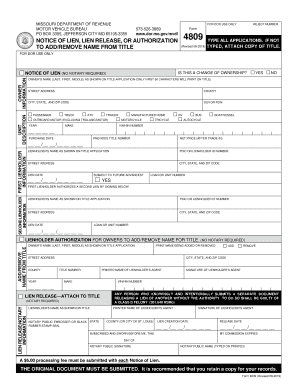
The MO 4809 form is used to notify the Missouri Department of Revenue about a lien, lien release, or authorization regarding vehicle titles. This guide will provide clear, step-by-step instructions to help you complete the form online with ease.
Follow the steps to complete the MO 4809 form online.
- Press the ‘Get Form’ button to access the online version of the MO 4809 form and open it in your chosen editor.
- In the owner information section, enter the owner's name, street address, county, city, state, and zip code exactly as they appear on the title application. Ensure to include all relevant details.
- Complete the unit description section by selecting the type of vehicle (e.g., passenger, truck, motorcycle) and filling in the year, make, and Vehicle Identification Number (VIN) as required.
- If applicable, fill out the first lienholder information. Include the lienholder's name, ID number, street address, city, state, and ZIP code, along with the lien date.
- If there is a second lienholder, repeat the process for the second lienholder information by providing the required details.
- If you are adding or removing a name from the title, fill in the necessary details regarding the name change, including the owner's name and the year of change.
- For lien releases, complete the lienholder's details as shown on the title, the release date, and include the signature and printed name of the lienholder's agent. Notary information will be required if you are releasing a lien.
- Review the completed form for accuracy and ensure all required fields are filled out correctly to avoid delays.
- After finalizing your entries, you can save changes to your online form, download a copy, print it, or share it for future reference.
Complete your documents online today for a smooth and efficient filing experience.