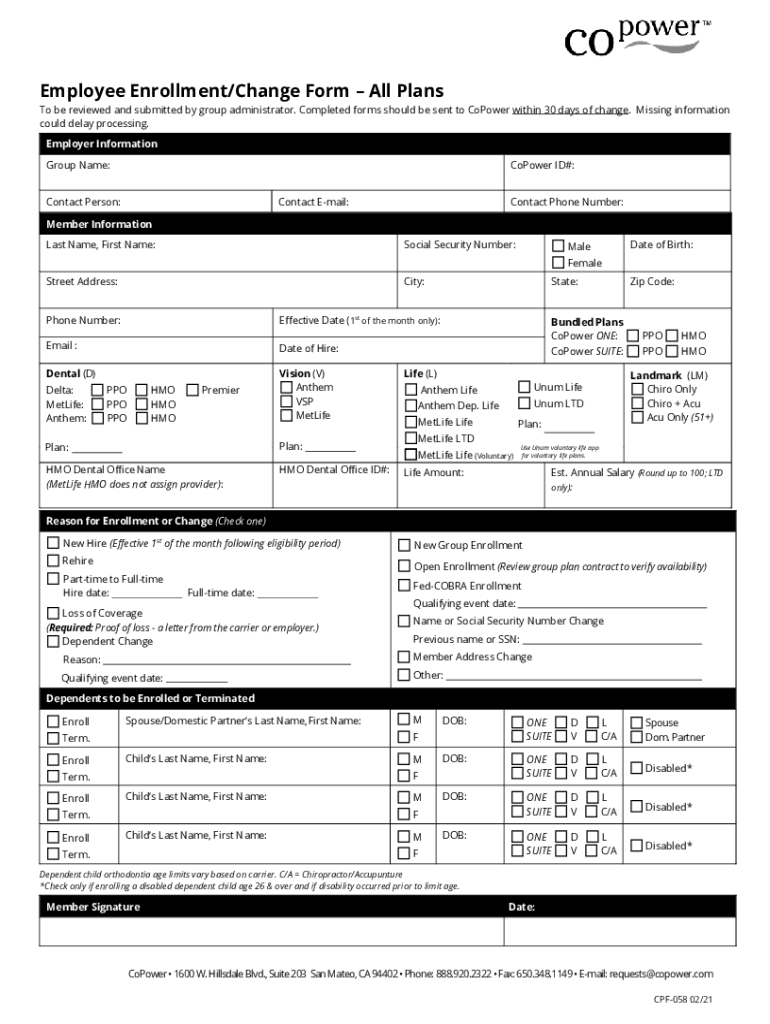
Employee Enrollment/Change Form All Plans To be reviewed and submitted by group administrator. Completed forms should be sent to Power within 30 days of change. Missing information could delay processing.

Open form follow the instructions

Easily sign the form with your finger

Send filled & signed form or save
How to use or fill out the CA CoPower CPF-058 online
Filling out the CA CoPower CPF-058 online is an essential step for users to enroll or make changes to their employee benefits. This guide provides clear instructions to ensure a smooth completion of the form.
Follow the steps to successfully complete your form.
- Press the ‘Get Form’ button to access the form and open it in your preferred online editor.
- Begin by filling in the employer information section. Provide the group name, CoPower ID number, contact person, email, and phone number to ensure accurate communication.
- Next, proceed to the member information section. Enter the last name and first name of the individual enrolling, along with their Social Security number and date of birth. Ensure the information is accurate to avoid delays.
- Select the gender option by marking either 'Male' or 'Female,' and then continue by filling in the street address, city, phone number, effective date (ensure it is the first of the month), and email address.
- Complete the date of hire field, and choose the applicable plans for dental and vision. You can select from options like Anthem, VSP, MetLife dental plans, and indicate the type of plan by checking the appropriate boxes.
- If applicable, fill out the bundled plans section for choices like CoPower ONE or SUITE, and detail any life insurance plans desired, including specifying the life amount and estimated annual salary.
- Indicate the reason for enrollment or change by checking the appropriate box. Common reasons include new hire, rehire, or loss of coverage, among others.
- In the dependents section, provide the necessary details for any dependents being enrolled or terminated, including their names and any required identifiers.
- Finally, ensure that the member signature and date are filled in at the bottom of the form to validate your submission.
- After completing the form, you can save your changes, and then download, print, or share the form as needed.
Complete your employee enrollment or change form online today for a streamlined experience.
Experience a faster way to fill out and sign forms on the web. Access the most extensive library of templates available.
Related content
31 Jan 2011 — 11.778.104-6 SSP/SP, enrolled in CPF/MF under No. 057.846.538-81, both of...
Sep 28, 2020 — Petitioner and Plaintiff, Western States Petroleum Association...
2.zez).2”, CA?,flCiTy. ' The Key Telephone ccnteins 2 microprocessor ihr? .Tp12...
Use professional pre-built templates to fill in and sign documents online faster. Get access to thousands of forms.
If you believe that this page should be taken down, please follow our DMCA take down process here.