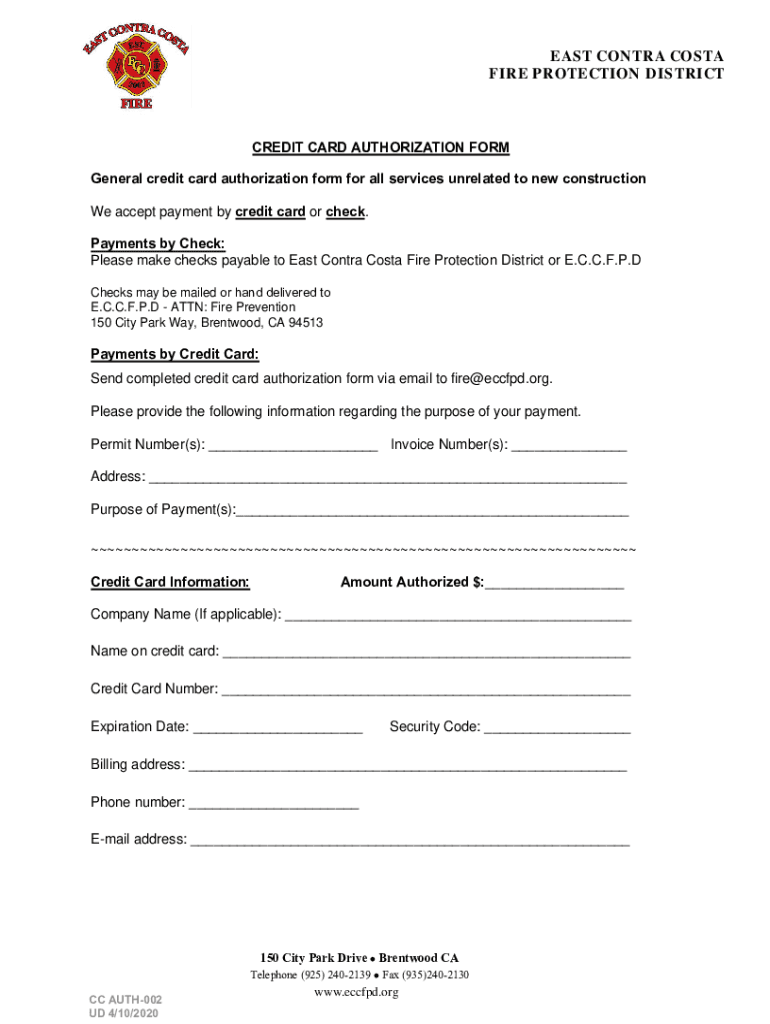
EAST CONTRA COSTA FIRE PROTECTION DISTRICTCREDIT CARD AUTHORIZATION FORM General credit card authorization form for all services unrelated to new construction We accept payment by credit card or check.

Open form follow the instructions

Easily sign the form with your finger

Send filled & signed form or save
How to fill out the CA CC AUTH-002 online
Completing the CA CC AUTH-002 credit card authorization form is essential for making payments to the East Contra Costa Fire Protection District. This guide provides clear instructions for filling out the form online, helping users ensure their payments are processed smoothly.
Follow the steps to complete your credit card authorization form online.
- Click ‘Get Form’ button to access the authorization form and open it in the online editor.
- Fill in the permit number(s) and invoice number(s) in the designated fields. This information helps identify the purpose of your payment.
- Provide your address in the specified section. Ensure all details are accurate to prevent any issues with your payment.
- State the purpose of your payment in the appropriate field. Clearly describe what the payment is for to assist in processing.
- Enter the authorized amount in dollars in the designated field. Make sure the amount reflects your intended payment.
- If applicable, include your company name in the provided space. This is important for those making payments on behalf of a business.
- Fill in your name as it appears on the credit card in the corresponding field. This must match the official cardholder's name.
- Input your credit card number. Double-check for accuracy to avoid processing issues.
- Indicate the expiration date of your credit card in the appropriate format. Ensure it is valid to prevent payment rejection.
- Enter the security code from the back of your credit card. This code adds an extra layer of security to your transaction.
- Provide the billing address associated with your credit card. This must match the one on file with your credit card company.
- Fill in your phone number and email address in the designated sections. This contact information is vital for any necessary follow-up.
- After completing all required fields, review your information for accuracy, then save your changes, download a copy of the form, or print it for your records.
- Submit the completed form via email to fire@eccfpd.org to finalize your payment.
Complete your credit card authorization form online today for a smooth payment process!
Experience a faster way to fill out and sign forms on the web. Access the most extensive library of templates available.
Related content
L Forms · LIC 00 (8/17) - Conversion to Resource Family: Release of Information · LIC...
In the Network Properties dialog box that appears: a. Click on the Security tab. b. Then...
Authentication Authorization and Accounting Configuration Guide Cisco IOS XE Release 3S.
Get answers to your most pressing questions about US Legal Forms API.
How do I send CC authorization?
For transactions that don't happen in person, you can mail a physical copy or email a digital copy of the credit card authorization form, so the customer can fill it out and send it back on their own time. They can print it out and sign or sign digitally with a tool like or .
What does CC authorization failure mean?
If the credit card has expired, or the cardholder enters incorrect information, such as the card number, expiration date, or CVV code, the authorization request may fail. It is essential for cardholders to keep track of their card's expiration date and provide accurate information during transactions.
What is a CC authorization number?
What Is an Authorization Code? A credit card authorization code is a two- to six-digit alphanumeric code that indicates whether a transaction has been approved or declined. When a transaction is declined, the specific code provides information about the reason for the decline.
What is CC Authorisation?
**Definition:**Credit card authorization is an approval from a card issuer, usually through a credit card processor, that the customer has sufficient funds to cover the cost of the transaction. It can also refer to the procedure of acquiring that authorization from the issuer.
What is an authorization number on a credit card?
A credit card authorization code is a two- to six-digit alphanumeric code that indicates whether a transaction has been approved or declined.
How do I verify a CC number?
Card verification value (CVV) checks Checking the three- or four-digit code on the back of the card is a straightforward and effective verification method.
How do I find my 6 digit authorization code?
An authorization code is a six digit alphanumeric code which is generated after making a transaction. You need to contact your Bank / Card provider for helping you with the Authorization Code specific to the transaction date and amount.
What is the authorization code 00?
00 – Approved: The transaction has gone through, and the sale is officially complete. All the other codes on this list deal with credit card declined codes (complete with tips on how to troubleshoot them). 01 – Refer to issuer: The transaction was rejected with no reason provided.
Use professional pre-built templates to fill in and sign documents online faster. Get access to thousands of forms.
If you believe that this page should be taken down, please follow our DMCA take down process here.