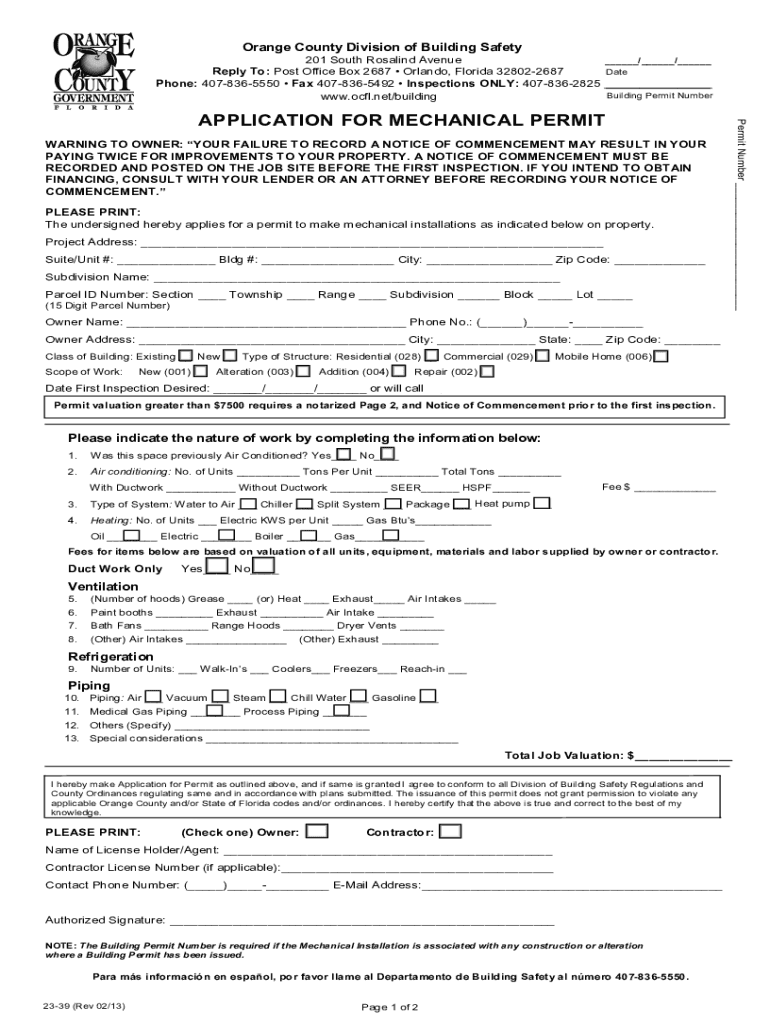
Orange County Division of Building Safety201 South Rosalind Avenue / / Date Reply To: Post Office Box 2687 Orlando, Florida 328022687 Phone: 4078365550 Fax 4078365492 Inspections ONLY: 4078362825.
Loading

Open form follow the instructions

Easily sign the form with your finger

Send filled & signed form or save
How to fill out the FL Application For Mechanical Permit - Orange County online
This guide provides detailed instructions on completing the FL Application For Mechanical Permit for Orange County electronically. By following these steps, users can ensure a smooth and efficient application process.
Follow the steps to successfully complete the application process.
- Click the ‘Get Form’ button to access the FL Application For Mechanical Permit and open it in your preferred form editor.
- Enter the date at the top of the form. This should reflect the date you are completing the application.
- Fill in the building permit number if applicable. If you do not have one, you may leave this field blank.
- Provide your project address, including suite/unit number, building number, city, and zip code. Ensure all information is accurate to avoid delays.
- Complete the subdivision name and parcel ID number fields. This will help identify the property location.
- Enter the owner's name and phone number. If the owner is different from the fee simple titleholder, provide their information as well.
- Specify the class of building (existing or new) and the type of structure (residential, commercial, or mobile home) by marking the relevant option.
- Indicate the scope of work: new, alteration, addition, or repair by marking the applicable option.
- Indicate the desired date for the first inspection or select 'will call' if you prefer to schedule it later.
- If the total permit valuation exceeds $7500, remember to prepare a notarized page 2 and the notice of commencement before this first inspection.
- Detail the nature of work required by answering all relevant questions regarding air conditioning, heating, refrigeration, and other installations as specified in the sections of the form.
- Complete the fee information section, ensuring the accuracy of the fee quoted based on your application.
- Review the applicant's declaration at the bottom of the first page. Sign and print the name, selecting if you are the owner or contractor.
- Complete all fields on page 2, including the detailed contact information for the fee simple titleholder, contractor, architect/engineer, and lender, if applicable.
- Submit the completed application as per the guidelines provided, ensuring all information is accurate. Once finished, you can save changes, download, print, or share the form.
Complete your application online to streamline the permit acquisition process.
Experience a faster way to fill out and sign forms on the web. Access the most extensive library of templates available.
Related content
Permitting Services or provided with this application. ... 400 South Orange Avenue ·...
May 10, 2016 — Orange County Final MS4 Permit. Permit Number: FLS000011-004. 2...
Non-U.S. citizens applying for an original driver license will be issued a 30-day, no...
Get answers to your most pressing questions about US Legal Forms API.
What can a homeowner do without a permit in Florida?
Permits shall not be required for the following work: Commercial low voltage burglar, security, cable TV and phone installations. ... Commercial painting. Commercial pressure washing.
How do I get my permit in Orange County Florida?
To obtain a learner's license, customers must be at least 15-years-old, complete the Traffic Law and Substance Abuse Education Course, pass the Road Signs and Road Rules Test (aka written test) and pass the Vision and Hearing Test.
How do I email Orange County permitting?
For additional questions, please email OrangeNOC@ocfl.net or call 407-836-5582.
Do you have to be a licensed contractor to pull a permit in Florida?
Florida State law requires construction to be done by licensed contractors. You have applied for a permit under an exemption to that law. The exemption allows you, as the owner of your property, to act as your own contractor with certain restrictions even though you do not have a license.
What is the law for HVAC in Florida?
While landlords under Florida law do not have to provide or maintain air conditioning, these are some of the items they are required to provide: electricity. running water. secure roofs, doors, and windows.
How to apply for a construction permit in Florida?
4 Easy Steps for Getting Your Building Permit Approved #1. Get the Application. You can find your local building permit application by going to your city's website. ... #2. Fill Out the Application. ... #3. Turn in your Application and Wait for Approval. ... #4. Receive Your Building Permit.
Can a homeowner pull an HVAC permit in Florida?
Generally, homeowners are able to pull their own permit and act as their own contractor under Florida Statute 489.103(7). The property must be in the homeowner's name and it must be the homeowner's primary residence.
Can a homeowner HVAC in Florida?
Most HVAC equipment manufacturers require that the equipment must be installed by a licensed HVAC contractor. If the equipment is not installed by a licensed HVAC contractor, warranty coverage is voided and the manufacturer will not cover the replacement of defective parts.
Use professional pre-built templates to fill in and sign documents online faster. Get access to thousands of forms.
If you believe that this page should be taken down, please follow our DMCA take down process here.