Loading

Open form follow the instructions

Easily sign the form with your finger

Send filled & signed form or save
How to fill out the Saiia online
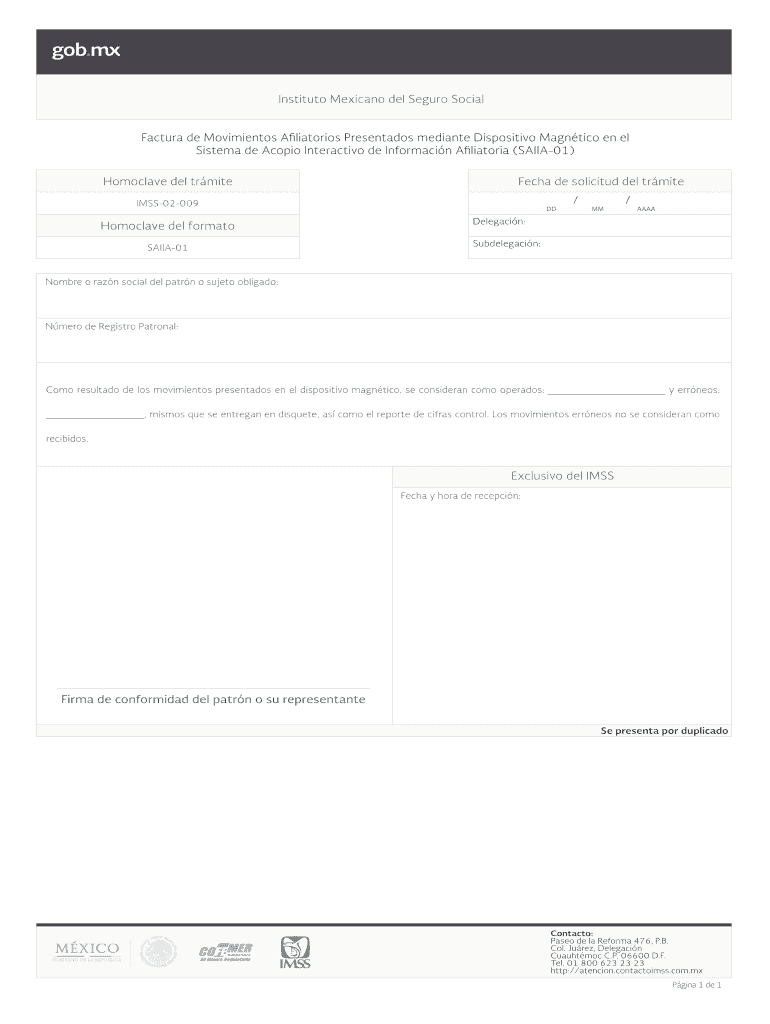
The Saiia (Sistema de Acopio Interactivo de Información Afiliatoria) form is essential for submitting affiliate movement reports digitally. This guide will walk you through the process of filling out the form online, ensuring accuracy and efficiency.
Follow the steps to complete the Saiia form online.
- Press the ‘Get Form’ button to access the form and open it in your preferred digital editor.
- In the section labeled 'Fecha de solicitud', enter the request date using the format DD/MM/AAAA.
- Locate the 'Folio del trámite' field and input the relevant reference number for your transaction.
- Fill in the 'Delegación' and 'Subdelegación' fields with the appropriate regional and subregional designations.
- Provide the 'Nombre o razón social del patrón o sujeto obligado' to indicate the name or business of the obligated party.
- Input the 'Número de Registro Patronal' which is essential for identifying the employer's registration.
- Describe the results of the submitted movements in the provided fields, specifying any accurate or erroneous movements.
- Make sure to include the date and time of receipt as per the form's requirements.
- Sign and date where indicated to confirm submission, ensuring the signature is from either the employer or their representative.
- After completing all sections, you can save changes, download, print, or share the filled form as needed.
Begin filling out your documents online today!
Experience a faster way to fill out and sign forms on the web. Access the most extensive library of templates available.
Related content
The inspections listed on SAFER are conducted in accordance with the North American...
The South African Institute of International Affairs (SAIIA) is an independent...
Corporate sustainability: an integrative definition and framework to evaluate corporate...
Get answers to your most pressing questions about US Legal Forms API.
How to make an FDF file?
To make an FDF file, you can use various applications that integrate with Saiia. Open your form or document, then look for the export or save as option in the menu. Choose 'FDF' from the list and confirm your selection. This will produce an FDF file that works effectively within the Saiia framework.
How to create a FDFx file?
Creating an FDFx file involves using software that supports the format, such as Saiia. Begin by choosing the appropriate document to convert. Select 'Export' and then choose the FDFx format from the options. This simple process allows your document to maintain compatibility with Saiia functions.
What does Saiia stand for?
Saiia stands for 'Strategy for the Advancement of Innovative Applications.' It represents a platform dedicated to enhancing legal processes and project management. By using Saiia, individuals and organizations can streamline their workflows, improve efficiency, and easily manage legal documentation. Understanding Saiia can empower you to better utilize its features.
How to create an Rproj file?
To create an Rproj file, you need to use RStudio, which integrates well with Saiia. Start RStudio, open a new project, and select 'New Project.' Choose 'New Directory' and select 'R Project,' then name your project and click 'Create Project.' This connects seamlessly with Saiia, enhancing your project organization.
How to create a .fdfx file?
Creating an .FDFx file can be accomplished by using tools that support Saiia's file formats. Begin by opening your document or template in the application. Then, look for export or save options and select the .FDFx format. This will allow you to save data in a manner compatible with Saiia.
How to create a vlx file?
To create a VLX file, start by using software that supports the format, like Saiia. Open your project and navigate to the save or export options. Select the VLX format from the list of file types, then click save. Ensure your project settings meet all requirements to ensure compatibility with Saiia.
What does International Relations study?
International Relations studies the interactions between nations, focusing on political, economic, and social relationships. This field examines various factors like diplomacy, conflict, and cooperation on a global scale. Through its research and publications, Saiia contributes significantly to discussions within this academic discipline.
What does Saiia do?
Saiia conducts research and advocacy on international relations, focusing on the implications for South Africa and the African continent. It engages policymakers, businesses, and the public through various reports, policy briefs, and events. By providing insights and fostering dialogue, Saiia aims to enhance understanding of global challenges.
Who funds Saiia?
Saiia receives funding from multiple sources, including both private and public entities. These funds support its commitment to research, education, and outreach in international affairs. Through its financial backing, Saiia is able to maintain independence and integrity in its analyses and offerings.
What is the abbreviation for the South African Journal of International Affairs?
The abbreviation for the South African Journal of International Affairs is 'Saiia'. This journal publishes research and analysis on international relations and global issues, specifically focusing on Southern Africa. By engaging with contributions from various scholars, Saiia plays a crucial role in fostering understanding of complex international topics.
Use professional pre-built templates to fill in and sign documents online faster. Get access to thousands of forms.
If you believe that this page should be taken down, please follow our DMCA take down process here.