Loading
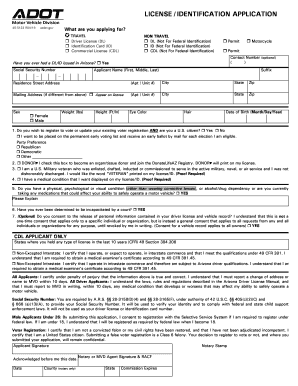
Get Az 40-5122 2019
How it works
-

Open form follow the instructions
-

Easily sign the form with your finger
-

Send filled & signed form or save
How to fill out the AZ 40-5122 online
Filling out the AZ 40-5122 form online can be a straightforward process if you follow the correct steps. This guide aims to provide you with clear instructions on effectively completing your application for a driver's license or identification card.
Follow the steps to successfully complete the AZ 40-5122 form.
- Click 'Get Form' button to access the online version of the AZ 40-5122 form.
- Select the type of application you are making by checking the appropriate box: Travel or Non-Travel. Then, choose whether you are applying for a Driver License (DL), Identification Card (ID), Commercial License (CDL), or a Permit.
- Provide your contact number (this field is optional). Then indicate whether you have ever had a DL/ID issued in Arizona by selecting 'Yes' or 'No.'
- Fill in your Social Security Number as required by the form for identity verification. Complete your full name including First, Middle, Last, and any Suffix.
- Choose your sex, eye color, weight, height, and hair color from the options provided.
- Enter your date of birth in the specified format (Month/Day/Year).
- If you wish to register to vote or update an existing registration, check the relevant boxes and indicate your party preference. If you are a U.S. citizen, check 'Yes'; if not, check 'No.'
- For additional options, check the boxes if you want to become an organ/tissue donor, identify as a U.S. military veteran, or display a medical condition on your ID.
- Respond to the questions regarding any physical, psychological, or visual conditions and engage in the consent process if applicable.
- If you are a CDL applicant, provide states where you held any type of license in the last 10 years, and verify your commercial operations.
- Read and certify the statements regarding the truthfulness of your information, the need for timely address or name updates, and voter registration certifications.
- Finally, sign the application, and if necessary, have the form notarized before submission. Ensure you save changes and download a copy for your records.
Complete your documents online today to ensure a smooth application process!
Get form
Experience a faster way to fill out and sign forms on the web. Access the most extensive library of templates available.
Non-Travel Driver Licenses do not comply with federal identification requirements and cannot be used at TSA airport security checkpoints starting May 7, 2025. The non-compliant credential will display NOT FOR FEDERAL PURPOSES across the front of the card.
Get This Form Now!
Use professional pre-built templates to fill in and sign documents online faster. Get access to thousands of forms.